This is best Fabric, Power BI, SQL and AI community event. How do we know? The last event sold out! Save €200 with code FABCMTY200.
Register nowThe Fabric community is upgrading! Read all of the details including the timeline and what you can expect. Learn more
I have loaded two excel (fact) tables into Power BI. Both have the same date formatting. However, when I create relationships between these two tables and my date (dimension table), Power BI imposes a bidirectional relationship on one of the tables, and a single, one-to-many on the other. I want both relationhips to be one-to-many. When I try to edit the bidirectional relationship, power BI says it is a many-to-many relationship. I have reviewed both excel tables and the date fields are formated exactly the same way, with no errors. What am I doing wrong??
Solved! Go to Solution.
Hi @Anonymous
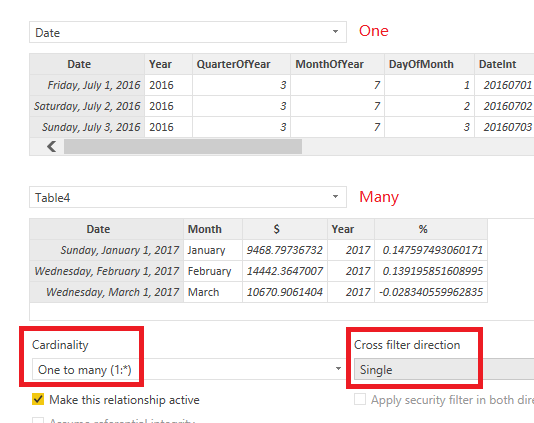
You may change the Cardinality to 'One to many' first. Then change the cross filter direction to single. Here are some articles for your reference.
Create and manage relationships in Power BI Desktop
What is the Direction of Relationship in Power BI?
Regards,
Cherie
Hi,
Share the link from where i can download your PBI file.
Hello Cherie,
Yes, the file is fixed. However, can you please tell me what was wrong, and how you remedied it?
Thanks.
Hi @Anonymous
You may change the Cardinality to 'One to many' first. Then change the cross filter direction to single. Here are some articles for your reference.
Create and manage relationships in Power BI Desktop
What is the Direction of Relationship in Power BI?
Regards,
Cherie
Join us in Barcelona for FabCon and SQLCon, the Fabric, Power BI, SQL, and AI community event. Save €200 with code FABCMTY200.
| User | Count |
|---|---|
| 24 | |
| 22 | |
| 20 | |
| 18 | |
| 14 |
| User | Count |
|---|---|
| 29 | |
| 22 | |
| 22 | |
| 20 | |
| 20 |