cancel
Showing results for 
Search instead for 
Did you mean: 

Learn from the best! Meet the four finalists headed to the FINALS of the Power BI Dataviz World Championships! Register now

Reply
Syndicate_Admin
Administrator
Administrator

Problem when Exporting Report to PDF

Hello, good day!

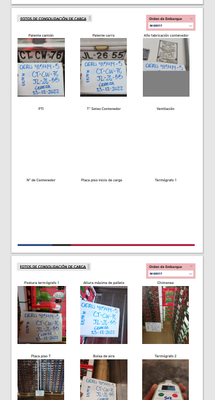
I have a Report, which contains 2 sheets that present visualizations of images. These images when using the function of "Export to PDF" are not printed completely, being halfway. I have noticed that this happens because, at the time of generating the PDF the report returns to preload the visual objects sheet by sheet, leaving the load of the images halfway when the function "PRINTS THE PDF".

wzuniga_0-1672316056798.png


Due to the above, the following question arises:
-Is it possible that once the information to be displayed is selected, block the preload it performs?
-Is it possible to block the page refresh when changing report sheet?


3 REPLIES 3
Syndicate_Admin
Administrator
Administrator

Export Wait = 
VAR WaitFactor = 10000
RETURN
COUNTX(
    CROSSJOIN(
        SELECTCOLUMNS(GENERATESERIES(1,WaitFactor),"Value1",[Value]),
        SELECTCOLUMNS(GENERATESERIES(1,WaitFactor),"Value2",[Value])),
   [Value2]*[Value1]
)

Searching and searching, I arrived at this measure that they implemented with a similar problem. Apply this measure on each sheet of the report, where you have to upload images.
For now, when using the function of "export to PDF" is no longer giving the problem and is functional.

Syndicate_Admin
Administrator
Administrator

Hello!
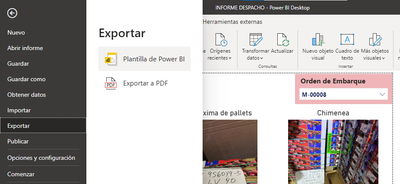
The following function is used:

wzuniga_0-1672402335989.png

when selecting "EXPORT TO PDF" you can not select a specific page, just print all the visible sheets of the report.

v-yinliw-msft
Community Support
Community Support

Hi @Syndicate_Admin ,


Could you please tell me when you export, do you choose Current Page or some other option?


Best Regards,

Community Support Team _Yinliw

If this post helps, then please consider Accept it as the solution to help the other members find it more quickly.

Helpful resources

Announcements
Join our Fabric User Panel

Join our Fabric User Panel

Share feedback directly with Fabric product managers, participate in targeted research studies and influence the Fabric roadmap.

February Power BI Update Carousel

Power BI Monthly Update - February 2026

Check out the February 2026 Power BI update to learn about new features.

FabCon Atlanta 2026 carousel

FabCon Atlanta 2026

Join us at FabCon Atlanta, March 16-20, for the ultimate Fabric, Power BI, AI and SQL community-led event. Save $200 with code FABCOMM.