This time we’re going bigger than ever. Fabric, Power BI, SQL, AI and more. We're covering it all. You won't want to miss it.
Learn moreLevel up your Power BI skills this month - build one visual each week and tell better stories with data! Get started
Hello, good day!
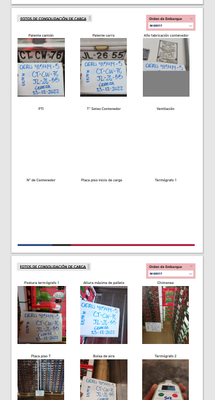
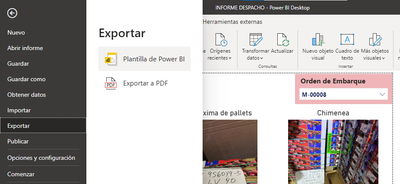
I have a Report, which contains 2 sheets that present visualizations of images. These images when using the function of "Export to PDF" are not printed completely, being halfway. I have noticed that this happens because, at the time of generating the PDF the report returns to preload the visual objects sheet by sheet, leaving the load of the images halfway when the function "PRINTS THE PDF".
Due to the above, the following question arises:
-Is it possible that once the information to be displayed is selected, block the preload it performs?
-Is it possible to block the page refresh when changing report sheet?
Export Wait =
VAR WaitFactor = 10000
RETURN
COUNTX(
CROSSJOIN(
SELECTCOLUMNS(GENERATESERIES(1,WaitFactor),"Value1",[Value]),
SELECTCOLUMNS(GENERATESERIES(1,WaitFactor),"Value2",[Value])),
[Value2]*[Value1]
) Searching and searching, I arrived at this measure that they implemented with a similar problem. Apply this measure on each sheet of the report, where you have to upload images.
For now, when using the function of "export to PDF" is no longer giving the problem and is functional.
Hello!
The following function is used:
when selecting "EXPORT TO PDF" you can not select a specific page, just print all the visible sheets of the report.
Hi @Syndicate_Admin ,
Could you please tell me when you export, do you choose Current Page or some other option?
Best Regards,
Community Support Team _Yinliw
If this post helps, then please consider Accept it as the solution to help the other members find it more quickly.
Sign up to receive a private message when registration opens and key events begin.
If you have recently started exploring Fabric, we'd love to hear how it's going. Your feedback can help with product improvements.
| User | Count |
|---|---|
| 31 | |
| 23 | |
| 22 | |
| 20 | |
| 15 |
| User | Count |
|---|---|
| 64 | |
| 41 | |
| 27 | |
| 22 | |
| 20 |