We've captured the moments from FabCon & SQLCon that everyone is talking about, and we are bringing them to the community, live and on-demand. Starts on April 14th. Register now
Hi,
I just try using Power BI some days ago.
Here is the problem: I could not use map. It just shows nothing.
I tested the same file with my colleague's desktop. It works instead.
I got window 10 on my laptop.
Could anyone help me on that?
Thanks,
Solved! Go to Solution.
Hi V-yuta-msft,
Thanks for your support,
Actually, the problem came from my laptop, so Power BI could not connect to Bing server and get map data. Thats why the map was blank,
Now it works nomally,
Regards,
Hi WHDung,
Can you share some screeshots on your own laptop when you encounter with this issue? In addtion, could you please share your PBIX file with some dummy data for further analysis?
Regards,
Jimmy Tao
Hi WHDung,
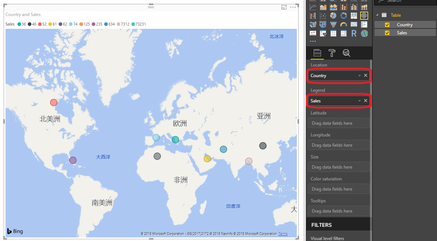
Create a Table by clicking "Enter Data", then in one column you should enter country name or post code. Then drag Country column to Location field as below:
For more details about Map Visual in power bi, please refer to: https://docs.microsoft.com/en-us/power-bi/power-bi-map-tips-and-tricks.
Regards,
Jimmy Tao
Hi V-yuta-msft,
Thanks for your support,
Actually, the problem came from my laptop, so Power BI could not connect to Bing server and get map data. Thats why the map was blank,
Now it works nomally,
Regards,
If you have recently started exploring Fabric, we'd love to hear how it's going. Your feedback can help with product improvements.
A new Power BI DataViz World Championship is coming this June! Don't miss out on submitting your entry.
Share feedback directly with Fabric product managers, participate in targeted research studies and influence the Fabric roadmap.
| User | Count |
|---|---|
| 53 | |
| 38 | |
| 33 | |
| 16 | |
| 16 |
| User | Count |
|---|---|
| 66 | |
| 63 | |
| 37 | |
| 34 | |
| 22 |