Join us at FabCon Atlanta from March 16 - 20, 2026, for the ultimate Fabric, Power BI, AI and SQL community-led event. Save $200 with code FABCOMM.
Register now!The Power BI Data Visualization World Championships is back! Get ahead of the game and start preparing now! Learn more
Hi
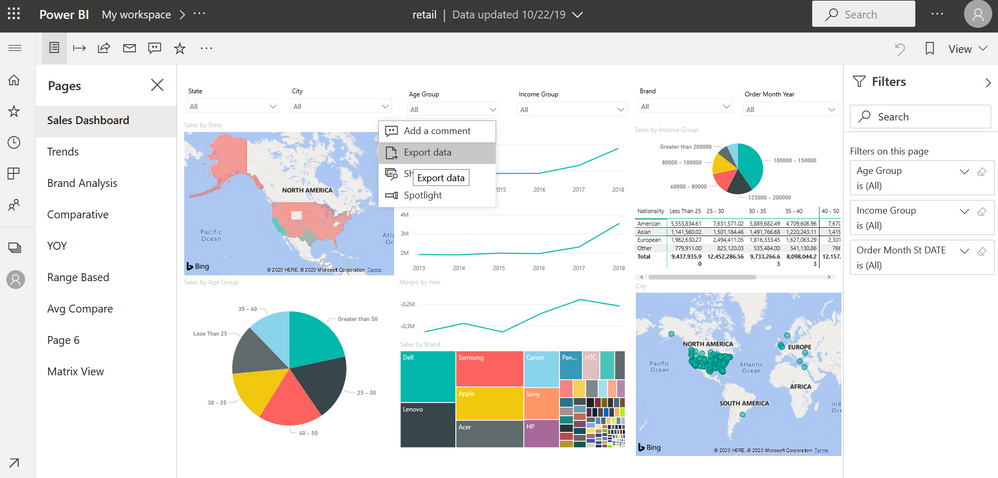
I have a report with a table, in PowerBi Desktop, I can use the 3 point to acces to the export data menu, all fine.
When I upload it to the Power Bi Service, this menu dissapears. I can only reach it using the edit mode in the service, and exporting the data.
Never saw this before, and I have use this featire very often, any idea what can I fix it?
Underlying data and summarized data download are active.
Thanks in advance
Solved! Go to Solution.
Hi @Anonymous
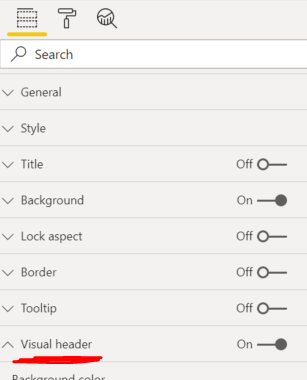
Check if Visual Heder > More Options Icon is toggled on.
Hi @Anonymous
No problem!
Hi @Anonymous
Check if Visual Heder > More Options Icon is toggled on.
Thanks!!! never used this feature and no idea why was changed!
Thanks again for the prompt answer.
Hi @Anonymous
No problem!
The Power BI Data Visualization World Championships is back! Get ahead of the game and start preparing now!
| User | Count |
|---|---|
| 46 | |
| 42 | |
| 34 | |
| 31 | |
| 21 |
| User | Count |
|---|---|
| 143 | |
| 125 | |
| 100 | |
| 81 | |
| 63 |