cancel
Showing results for 
Search instead for 
Did you mean: 

Try your skills in the Power BI Dataviz World Championship! Round one ends June 26. Join now

Reply
Leila
Regular Visitor

Problem With Growth Rate %

 Hi all

I have read all about the Month over Month formulas in community. But non of those codes, DAXes and formulas solved my issue. I would be veryyyy grateful if you can help me.


I made a table grouped by dates and want to have the growth rate of 'Sessions' in  D/W/M over D/W/Month.


PrevDay=DATEADD(Visitor[Date].[Date], -1 , DAY)   ( I also used PREVIOUSDAY function but it did not work)

PreDaySessions = CALCULATE(SUM(Visitor[SessionS]), Visitor[PrevDay]) (This formula doesn't seem to function, cause, the same sessions are in front of the previous date in the table.

The two above formulas should be COLUMNS but '%change' results in blank!!!! So I defined them as MEASURES, as suggested by post.

% Change = (SUM(Visitor[SessionS]) - [PrevDaySessions])/ [PrevDaySessions]

Obviously '% Change' is not true!!! Since Sessions should appear with an aggregate function(SUM in here) cause it is a column, but [PrevDaySessions] is a measure and cannot be aggregated.


PreDaySessions should be shifted one cell downPreDaySessions should be shifted one cell down

If first cell in PreDaySessions could have been blank by a formula,the Problem would be solved

  
It's been 3 days since I have been dealing with a simple growth rate formula. I hope there would be a solution 🙂


1 ACCEPTED SOLUTION
v-haibl-msft
Microsoft Employee
Microsoft Employee

@Leila


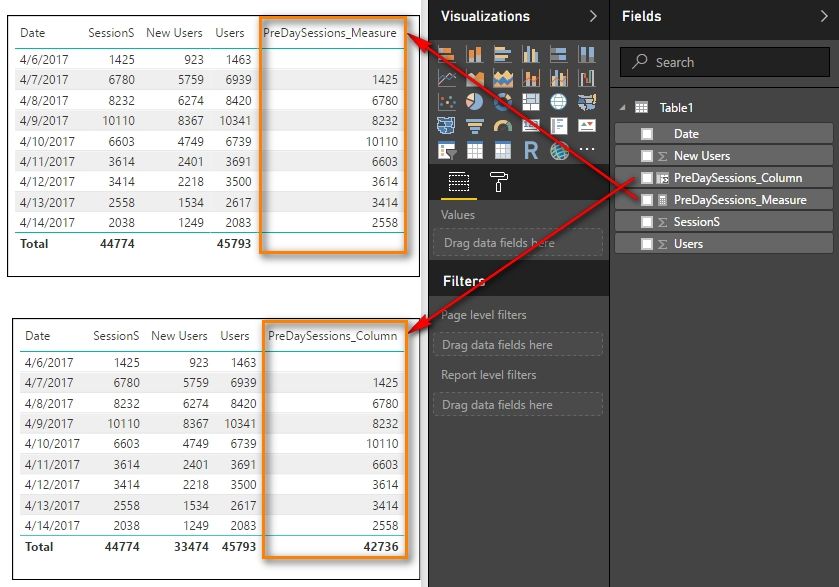
We can create a calculated column or measure to get the PreDaySessions with following DAX formulas.


PreDaySessions_Column = 
VAR CurrentDay = Table1[Date]
VAR PreDay =
    CALCULATE ( MAX ( Table1[Date] ), FILTER ( Table1, Table1[Date] < CurrentDay ) )
RETURN
    LOOKUPVALUE ( Table1[SessionS], Table1[Date], PreDay )
PreDaySessions_Measure = 
VAR PreDay =
    PREVIOUSDAY ( Table1[Date] )
RETURN
    LOOKUPVALUE ( Table1[SessionS], Table1[Date], PreDay )

Problem With Growth Rate %_1.jpg


Best Regards,
Herbert

View solution in original post

2 REPLIES 2
v-haibl-msft
Microsoft Employee
Microsoft Employee

@Leila


We can create a calculated column or measure to get the PreDaySessions with following DAX formulas.


PreDaySessions_Column = 
VAR CurrentDay = Table1[Date]
VAR PreDay =
    CALCULATE ( MAX ( Table1[Date] ), FILTER ( Table1, Table1[Date] < CurrentDay ) )
RETURN
    LOOKUPVALUE ( Table1[SessionS], Table1[Date], PreDay )
PreDaySessions_Measure = 
VAR PreDay =
    PREVIOUSDAY ( Table1[Date] )
RETURN
    LOOKUPVALUE ( Table1[SessionS], Table1[Date], PreDay )

Problem With Growth Rate %_1.jpg


Best Regards,
Herbert

Thank you very much Herbert

Warm regards,

Leila

Helpful resources

Announcements
Fabric Data Days is here Carousel

Fabric Data Days 2026

Don't miss out on Data Days, June 15 through August 7. Learn Fabric, Power BI, SQL, AI and more.

Power BI DataViz World Championships carousel

Power BI DataViz World Championships - June 2026

A new Power BI DataViz World Championship is coming this June! Don't miss out on submitting your entry.