Join us at FabCon Atlanta from March 16 - 20, 2026, for the ultimate Fabric, Power BI, AI and SQL community-led event. Save $200 with code FABCOMM.
Register now!The Power BI Data Visualization World Championships is back! Get ahead of the game and start preparing now! Learn more
Hi all
I have read all about the Month over Month formulas in community. But non of those codes, DAXes and formulas solved my issue. I would be veryyyy grateful if you can help me.
I made a table grouped by dates and want to have the growth rate of 'Sessions' in D/W/M over D/W/Month.
PrevDay=DATEADD(Visitor[Date].[Date], -1 , DAY) ( I also used PREVIOUSDAY function but it did not work)
PreDaySessions = CALCULATE(SUM(Visitor[SessionS]), Visitor[PrevDay]) (This formula doesn't seem to function, cause, the same sessions are in front of the previous date in the table.
The two above formulas should be COLUMNS but '%change' results in blank!!!! So I defined them as MEASURES, as suggested by post.
% Change = (SUM(Visitor[SessionS]) - [PrevDaySessions])/ [PrevDaySessions]
Obviously '% Change' is not true!!! Since Sessions should appear with an aggregate function(SUM in here) cause it is a column, but [PrevDaySessions] is a measure and cannot be aggregated.
PreDaySessions should be shifted one cell down
If first cell in PreDaySessions could have been blank by a formula,the Problem would be solved
It's been 3 days since I have been dealing with a simple growth rate formula. I hope there would be a solution 🙂
Solved! Go to Solution.
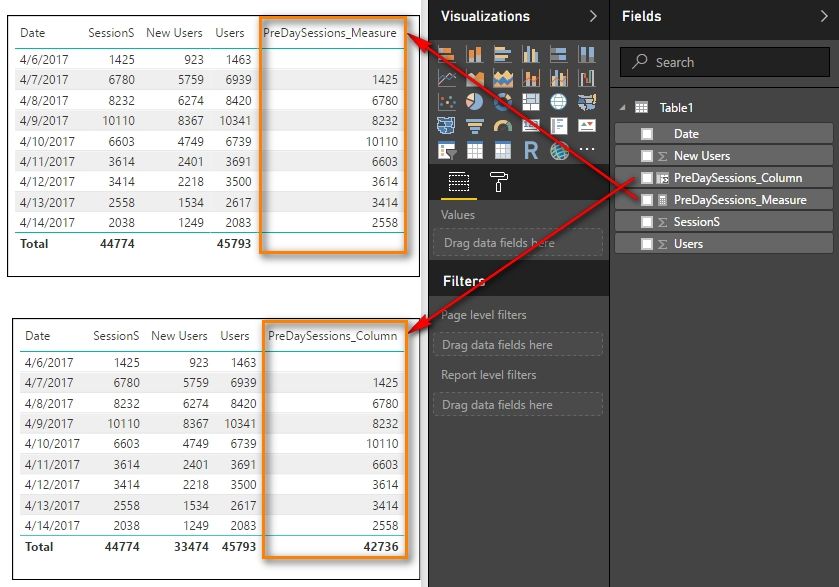
We can create a calculated column or measure to get the PreDaySessions with following DAX formulas.
PreDaySessions_Column =
VAR CurrentDay = Table1[Date]
VAR PreDay =
CALCULATE ( MAX ( Table1[Date] ), FILTER ( Table1, Table1[Date] < CurrentDay ) )
RETURN
LOOKUPVALUE ( Table1[SessionS], Table1[Date], PreDay )
PreDaySessions_Measure =
VAR PreDay =
PREVIOUSDAY ( Table1[Date] )
RETURN
LOOKUPVALUE ( Table1[SessionS], Table1[Date], PreDay )
Best Regards,
Herbert
We can create a calculated column or measure to get the PreDaySessions with following DAX formulas.
PreDaySessions_Column =
VAR CurrentDay = Table1[Date]
VAR PreDay =
CALCULATE ( MAX ( Table1[Date] ), FILTER ( Table1, Table1[Date] < CurrentDay ) )
RETURN
LOOKUPVALUE ( Table1[SessionS], Table1[Date], PreDay )
PreDaySessions_Measure =
VAR PreDay =
PREVIOUSDAY ( Table1[Date] )
RETURN
LOOKUPVALUE ( Table1[SessionS], Table1[Date], PreDay )
Best Regards,
Herbert
Thank you very much Herbert
Warm regards,
Leila
The Power BI Data Visualization World Championships is back! Get ahead of the game and start preparing now!
| User | Count |
|---|---|
| 44 | |
| 40 | |
| 33 | |
| 30 | |
| 23 |
| User | Count |
|---|---|
| 125 | |
| 119 | |
| 90 | |
| 75 | |
| 69 |