
cancel
Showing results for 
Search instead for 
Did you mean: 

July 7 - July 17 | Round 2 of the Power BI Dataviz World Championships. Don't miss your chance! Learn more

Reply
ysherriff
Resolver II
Resolver II

Prior Week Sales

Hi all,


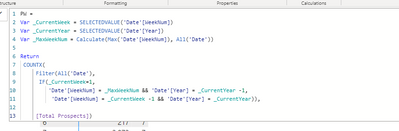
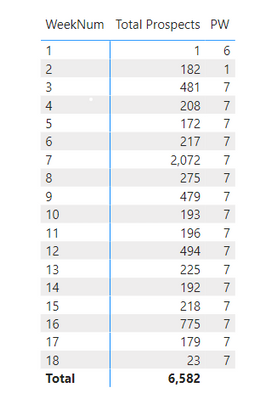
I have followed this video from Enterprise DNA, https://youtu.be/jclWnA7pEvY , on how to compute prior week sales. But for some reason my output is not correct. Below is the DAX formula and the output. Thank you for your help.  Also, how can i upload a WIP file? I don't see a link for file upload?


ysherriff_3-1651673822812.png


ysherriff_0-1651673405412.png


5 REPLIES 5
johnt75
Super User
Super User

That looks fine.

Don't think you can upload a file through this site, most people share from Google Drive or Dropbox or similar

johnt75
Super User
Super User

Add a week commencing column to your date table, like

[Date] - WEEKDAY([Date],2) + 1

That starts the week on a Monday, you can adjust if needed. Then change your measure to

Prior Week = 
var currentWC = SELECTEDVALUE('Date'[W / C])
return CALCULATE( [Total Prospects], REMOVEFILTERS('Date'), 'Date'[W / C] = currentWC - 7)

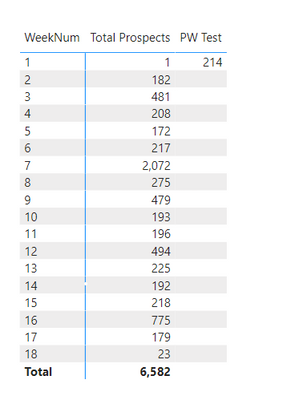
Thank you but this is what your formula is showing


ysherriff_0-1651675560102.png


Below is the formula for Week Commencing. 

ysherriff_1-1651675621792.png


Hmm, it works for me.

What is the formula for [Total Prospects] ?

Also, use Performance Analyzer to get the DAX code generated for the table visual, and have a look at that in DAX Studio. See if any additional filters are being applied which would need to be taken care of.

The formula for Total Prospects is 


Total Prospects =COUNTA( ( Prospects[Contact ID]))
 
I will check the performance analyzer. How can i upload a file?

Helpful resources

Announcements
FabCon and SQLCon Barcelona 2026

FabCon & SQLCon – Barcelona 2026

Join us in Barcelona for FabCon and SQLCon, the Fabric, Power BI, SQL, and AI community event. Save €200 with code FABCMTY200.

60 days of Data Days Carousel

Data Days 2026

Join Fabric Data Days 2026: 60 days of free live/on-demand sessions, challenges, study groups, and certification opportunities.

Power BI DataViz World Championships carousel

Power BI DataViz World Championships - June 2026

A new Power BI DataViz World Championship is coming this June! Don't miss out on submitting your entry.