cancel
Showing results for 
Search instead for 
Did you mean: 

The Power BI Data Visualization World Championships is back! Get ahead of the game and start preparing now! Learn more

Reply
Anonymous
Not applicable

Print Status

Hi All,

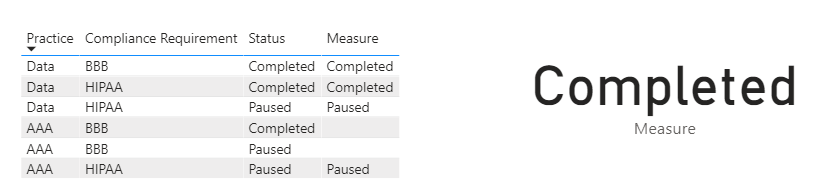
I want to print my staus in a measure.

Please help.

Instead of count I want to print the status.


image.png

3 REPLIES 3
Anonymous
Not applicable

Hi @Anonymous ,

Just use the formula as follows:

Measure =
CALCULATE (
    MIN ( 'COMPLIANCE_DB'[Status] ),
    FILTER (
        'COMPLIANCE_DB',
        'COMPLIANCE_DB'[Practice] = "Data"
            || 'COMPLIANCE_DB'[Compliance Requirement] = "HIPAA"
                && 'COMPLIANCE_DB'[Index] = MIN ( 'COMPLIANCE_DB'[Index] )
    )
)

9.28.1.1.PNG

Did I answer your question ? Please mark my reply as solution. Thank you very much.

If not, please upload some insensitive data samples and expected output.


Best Regards,

Eyelyn Qin

nandic
Super User
Super User

@Anonymous ,
Is current formula still needed or you are interested to only display the status value?
Calculate function returns one value, and mainly it is used to return numeric (aggregated) values - as you did it.
Also, you can return text values if you use function like FirstNonBlank (column).
If you display new measure and column for status in a list, it will display count per each status.
Could you send image what is expected output?

Anonymous
Not applicable

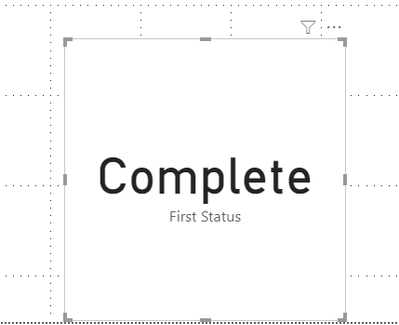
This is the the status I am looking forimage.png


Helpful resources

Announcements
Power BI DataViz World Championships

Power BI Dataviz World Championships

The Power BI Data Visualization World Championships is back! Get ahead of the game and start preparing now!

December 2025 Power BI Update Carousel

Power BI Monthly Update - December 2025

Check out the December 2025 Power BI Holiday Recap!

FabCon Atlanta 2026 carousel

FabCon Atlanta 2026

Join us at FabCon Atlanta, March 16-20, for the ultimate Fabric, Power BI, AI and SQL community-led event. Save $200 with code FABCOMM.