Don't miss your chance to take exam DP-600 or DP-700 on us!
Request nowLearn from the best! Meet the four finalists headed to the FINALS of the Power BI Dataviz World Championships! Register now
Hi All,
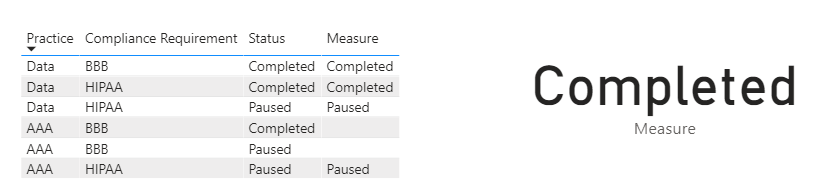
I want to print my staus in a measure.
Please help.
Instead of count I want to print the status.
Hi @Anonymous ,
Just use the formula as follows:
Measure =
CALCULATE (
MIN ( 'COMPLIANCE_DB'[Status] ),
FILTER (
'COMPLIANCE_DB',
'COMPLIANCE_DB'[Practice] = "Data"
|| 'COMPLIANCE_DB'[Compliance Requirement] = "HIPAA"
&& 'COMPLIANCE_DB'[Index] = MIN ( 'COMPLIANCE_DB'[Index] )
)
)Did I answer your question ? Please mark my reply as solution. Thank you very much.
If not, please upload some insensitive data samples and expected output.
Best Regards,
Eyelyn Qin
@Anonymous ,
Is current formula still needed or you are interested to only display the status value?
Calculate function returns one value, and mainly it is used to return numeric (aggregated) values - as you did it.
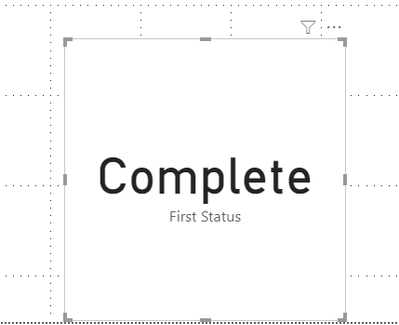
Also, you can return text values if you use function like FirstNonBlank (column).
If you display new measure and column for status in a list, it will display count per each status.
Could you send image what is expected output?
This is the the status I am looking for
Share feedback directly with Fabric product managers, participate in targeted research studies and influence the Fabric roadmap.
Check out the February 2026 Power BI update to learn about new features.
| User | Count |
|---|---|
| 55 | |
| 49 | |
| 33 | |
| 16 | |
| 15 |
| User | Count |
|---|---|
| 85 | |
| 70 | |
| 38 | |
| 28 | |
| 25 |