cancel
Showing results for 
Search instead for 
Did you mean: 

Join the FabCon + SQLCon recap series. Up next: Power BI, Real-Time Intelligence, IQ and AI, and Data Factory take center stage. All sessions are available on-demand after the live show. Register now

Reply
richrich123
Helper III
Helper III

Preview Error

Hi,


Since I upgraded to latest version, I am getting preview errors on multiple tables, was fine before. I have seen a few other people have started getting this since upgrade but none of the items suggested have resolved this. On one table (Dyanmcs (Incident Resolutions), I am only pulling 5 columns.

 

richrich123_0-1685609340600.png


I need to edit my fields under 'removed columns' but can't as I am getting the error "we cannot modify this step becasue there is are error steps, please resolve those errors first
 

richrich123_1-1685609360375.png

Im also getting the same problem with the systemusers table. Some others are fine.


I tried disabling this as was suggested on another post but didn't help:


richrich123_2-1685609507075.png


Thanks

2 REPLIES 2
richrich123
Helper III
Helper III

@Anonymous , Im not familar with TRF as suggested in that post but either way, I cant see rolling back will help me becuase if I create a brand new PBI and just get the users or case table, it still gives this error as soon as I select the table and hit the transform button.

Anonymous
Not applicable

Hi @richrich123 ,

I found that there is one similar thread as yours, hope its solution can help you solve your problem.

Solved: Re: Preview.Error: The type of the current preview... - Microsoft Fabric Community

I updated to the latest version of Power BI, but now It's not loading at all. Refreshin just get stuck with the system users table. The steps Source and Navigation seem to be the problem, as the table does load the steps after those. But with refreshing it just gets stuck at 28 kb, while other tables load normally. 

EDIT:
Problem has been solved. I reverted back to an older version of the file (using tfs) and the issue wasn't there. The only difference is a few steps in the query that change the data type of columns. Very weird, but it works now haha  

If the above one can't help you, could you please provide the following info for further investigation?

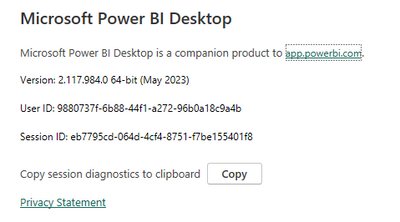
  1. What's the version of your Power BI Desktop? Can it work if revert back the version of your Power BI Desktop to older one?
  2. Did you make any change on your pbix file?
  3. What's the data source of your report?
  4. The applied codes of the tables which occurred the errorvyiruanmsft_2-1685945607845.png

Best Regards

Helpful resources

Announcements
April Power BI Update Carousel

Power BI Monthly Update - April 2026

Check out the April 2026 Power BI update to learn about new features.

New to Fabric survey Carousel

New to Fabric Survey

If you have recently started exploring Fabric, we'd love to hear how it's going. Your feedback can help with product improvements.

Power BI DataViz World Championships carousel

Power BI DataViz World Championships - June 2026

A new Power BI DataViz World Championship is coming this June! Don't miss out on submitting your entry.

FabCon and SQLCon Highlights Carousel

FabCon &SQLCon Highlights

Experience the highlights from FabCon & SQLCon, available live and on-demand starting April 14th.