Join us at FabCon Atlanta from March 16 - 20, 2026, for the ultimate Fabric, Power BI, AI and SQL community-led event. Save $200 with code FABCOMM.
Register now!The Power BI Data Visualization World Championships is back! Get ahead of the game and start preparing now! Learn more
Talking about M (Power Query) language here. How can I parameterize or otherwise make dynamic the 3 arguments in the #date function?
#date(2017, 6, 16)
I have a 1 row, 1 column table with a single date value (which will change dynamically upon refresh) and I want to add rows (future dates) to that table. The #date function seems to want to accept only hard-coded numbers. I've gotta believe that either isn't true or there is another way.
Thanks!!
Solved! Go to Solution.
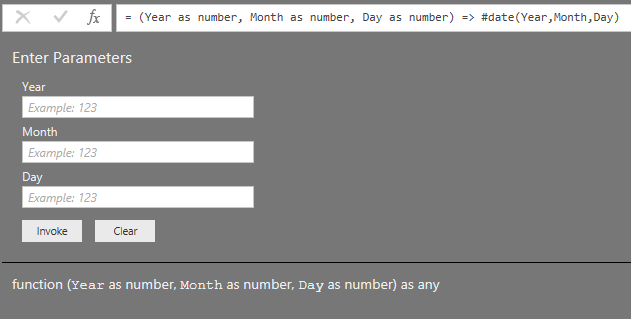
You don't need hard coded values: this function works perfectly fine;
Edit: If you are looking for alternatives then please specify exactly what should happen.
E.g. you can create a series of numbers and then change the type to date.
Or you can use List.Dates.
E,g, this fuction creates a table with1 column with 10 dates:
(Year as number, Month as number, Day as number) => Table.FromColumns({List.Dates(#date(Year,Month,Day),10,#duration(1,0,0,0))}, type table[Date as date])
You don't need #date if you have a date in a single row, single column table. Just load it up and change to format to type date if needed
You don't need hard coded values: this function works perfectly fine;
Edit: If you are looking for alternatives then please specify exactly what should happen.
E.g. you can create a series of numbers and then change the type to date.
Or you can use List.Dates.
E,g, this fuction creates a table with1 column with 10 dates:
(Year as number, Month as number, Day as number) => Table.FromColumns({List.Dates(#date(Year,Month,Day),10,#duration(1,0,0,0))}, type table[Date as date])
Thanks @MarcelBeug. I was able to adopt a concept from your reply to make my effort work. I replicated my single cell query 3 times so that I could convert each component (year, month, and day) into lists. So I ended up with 3 list queries. I was then able to create parameters (query option) on each of those. I was then able to create a new query that used those parameters to generate a list of dates. Not sure if my solution is the best way to go about this but at least its dynamic and automated and gets me what I want.
The Power BI Data Visualization World Championships is back! Get ahead of the game and start preparing now!
| User | Count |
|---|---|
| 38 | |
| 36 | |
| 33 | |
| 32 | |
| 29 |
| User | Count |
|---|---|
| 129 | |
| 88 | |
| 79 | |
| 68 | |
| 63 |