Join us at FabCon Atlanta from March 16 - 20, 2026, for the ultimate Fabric, Power BI, AI and SQL community-led event. Save $200 with code FABCOMM.
Register now!Learn from the best! Meet the four finalists headed to the FINALS of the Power BI Dataviz World Championships! Register now
We have reports already created on powerbi and everything was working perfectly.
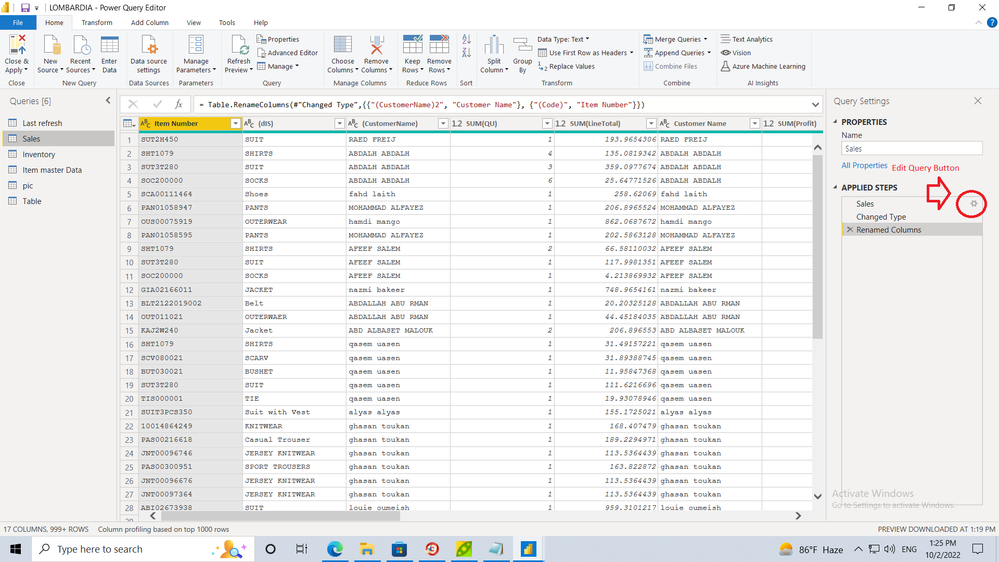
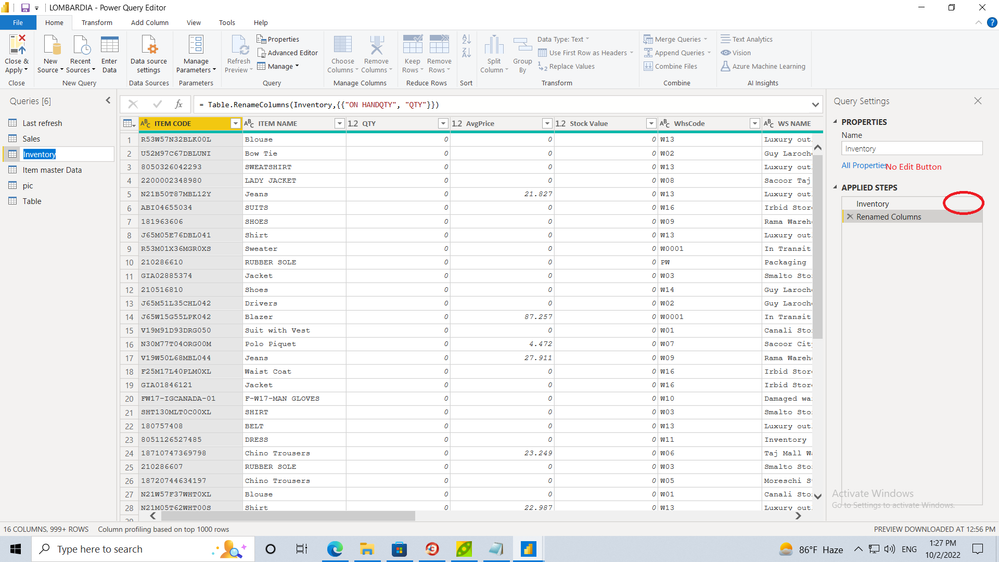
after last update some reports query become unmediatable and the button for edit disappeared.
so now we cant edit any query and we need your help to fix it urgently .
the attached files contain two samples of reports, one can be edited and if we save the button also disappeared.
the other one no edit button.
Solved! Go to Solution.
Hi @moath85 ,
There's an option of Advanced Editor at the top in Home Ribbon like @Dinesh_Suranga mentioned where you can see all the applied steps in your query and any changes required in the query can be made from there.
Thanks,
Avantika
Share feedback directly with Fabric product managers, participate in targeted research studies and influence the Fabric roadmap.
Check out the February 2026 Power BI update to learn about new features.
| User | Count |
|---|---|
| 61 | |
| 59 | |
| 42 | |
| 18 | |
| 15 |
| User | Count |
|---|---|
| 109 | |
| 102 | |
| 39 | |
| 29 | |
| 29 |