Don't miss your chance to take the Fabric Data Engineer (DP-600) exam for FREE! Find out how by attending the DP-600 session on April 23rd (pacific time), live or on-demand.
Learn moreNext up in the FabCon + SQLCon recap series: The roadmap for Microsoft SQL and Maximizing Developer experiences in Fabric. All sessions are available on-demand after the live show. Register now
We have reports already created on powerbi and everything was working perfectly.
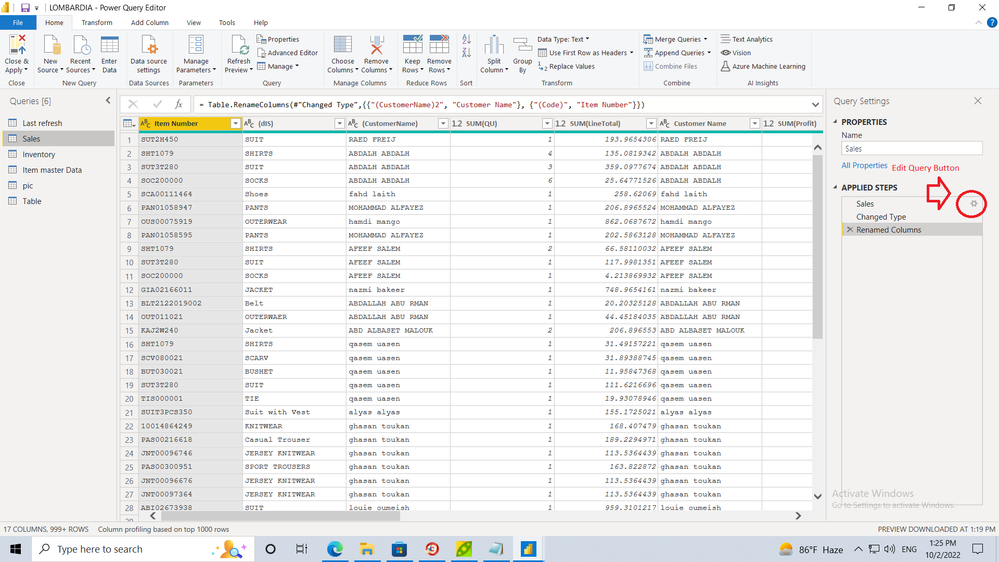
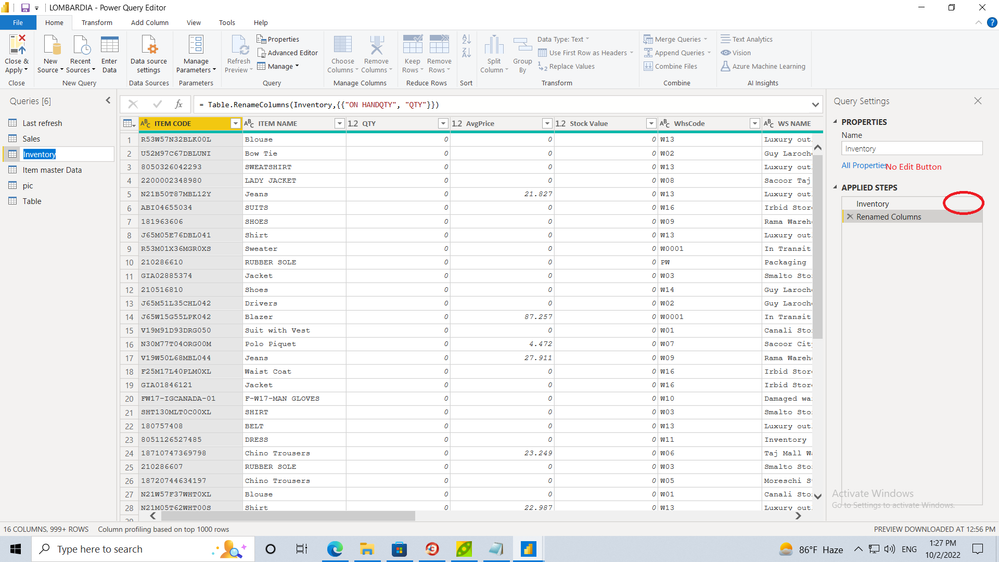
after last update some reports query become unmediatable and the button for edit disappeared.
so now we cant edit any query and we need your help to fix it urgently .
the attached files contain two samples of reports, one can be edited and if we save the button also disappeared.
the other one no edit button.
Solved! Go to Solution.
Hi @moath85 ,
There's an option of Advanced Editor at the top in Home Ribbon like @Dinesh_Suranga mentioned where you can see all the applied steps in your query and any changes required in the query can be made from there.
Thanks,
Avantika
If you have recently started exploring Fabric, we'd love to hear how it's going. Your feedback can help with product improvements.
A new Power BI DataViz World Championship is coming this June! Don't miss out on submitting your entry.
| User | Count |
|---|---|
| 45 | |
| 43 | |
| 38 | |
| 19 | |
| 15 |
| User | Count |
|---|---|
| 67 | |
| 66 | |
| 31 | |
| 28 | |
| 24 |