cancel
Showing results for 
Search instead for 
Did you mean: 

The Power BI Data Visualization World Championships is back! Get ahead of the game and start preparing now! Learn more

Reply
CamiloG
New Member

PowerBI data import - blanks being autopopulated

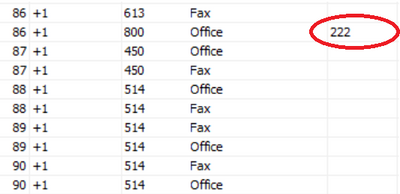
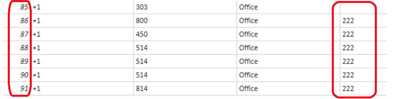
In an SQL database, a column (EXTENSION) has blanks, however, when the data is imported into PowerBI, some blanks get filled with the data of the previous cell.

SQL 

CamiloG_3-1665154474476.png

PowerBI 


CamiloG_4-1665154536577.png

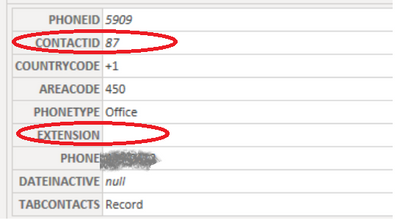
However, in the row view, I can see the field (EXTENSION) is empty


CamiloG_5-1665154663278.png

How can I avoid PowerBI to autofill the values when the field is blank?

4 REPLIES 4
ImkeF
Community Champion
Community Champion

Hi @CamiloG ,
I have never seen anything like that happening before.
Please check the M-code that has been generated automatically in the editor to see if any steps have been created there that do this fill-down. Then delete them.

Imke Feldmann (The BIccountant)

If you liked my solution, please give it a thumbs up. And if I did answer your question, please mark this post as a solution. Thanks!

How to integrate M-code into your solution -- How to get your questions answered quickly -- How to provide sample data -- Check out more PBI- learning resources here -- Performance Tipps for M-queries

Nothing unusual was added, however, I just added a new column based on the one showing the errors. I check for blanks and make them spaces in a new column. Somehow, the new column does show the correct format.

    TABPHONE_Table1 = Table.AddColumn(TABPHONE_Table,"EXT",
        each if [EXTENSION] = "" then " " else [EXTENSION]),
    #"Removed Columns" = Table.RemoveColumns(TABPHONE_Table1,{"EXTENSION"})

I still would like to know where the error is coming from, as there is the potential on having more tables with similar issues.

Anonymous
Not applicable

Just a thought, Blanks and nulls are not the same even though they may look the same in SQL in your query window, "depending". They are handled completely differently in SQL and PBI. Not sure if this is your issue but it's worth looking into.

Anonymous
Not applicable

I have found that, in general, null is a much better choice than BLANK. It will still show as an empty data point in your report and is much more likely to be handled correctly. That being said, it is very important to understand the differences.


Helpful resources

Announcements
Power BI DataViz World Championships

Power BI Dataviz World Championships

The Power BI Data Visualization World Championships is back! Get ahead of the game and start preparing now!

December 2025 Power BI Update Carousel

Power BI Monthly Update - December 2025

Check out the December 2025 Power BI Holiday Recap!

FabCon Atlanta 2026 carousel

FabCon Atlanta 2026

Join us at FabCon Atlanta, March 16-20, for the ultimate Fabric, Power BI, AI and SQL community-led event. Save $200 with code FABCOMM.