cancel
Showing results for 
Search instead for 
Did you mean: 

Learn from the best! Meet the four finalists headed to the FINALS of the Power BI Dataviz World Championships! Register now

Reply
kostiskampouris
Frequent Visitor

PowerBI Matrix

Hello everyone!


I am a complete begginer in PowerBI.


Trying to built my 1st report I have a problem in a matrix.


I have create 3 measures as 

NetVal(PY) = CALCULATE(sum(AK_POWERBI_CRMALL[CRMALLnet_val]);filter('Date';'Date'[Year]=MIN('Date'[Year])))

NetVal(CY) = CALCULATE(sum(AK_POWERBI_CRMALL[CRMALLnet_val]);filter('Date';'Date'[Year]=max('Date'[Year])))

NetVal Dif = ([NetVal(CY)]/[NetVal(PY)])-1


The user selects 2 years and the result is the total netval for those years and the comparison between them 
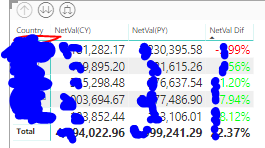
 

Matrix.PNGwhat I want to achieve is to show the hole comparison in the rows like belowmatrix2.PNG
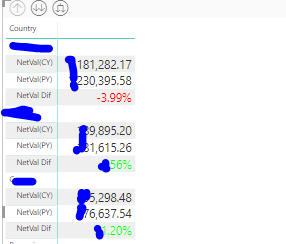
(here I used the formating show on rows )

The problem is that except the netval field I want to add as columns the exact same thing but for other fields.

COUNTRYNETVALQUANTITY
A100006
B50004
C100%50%

...

I cant find a way to add more columns.


Please help,Thank you in advance

4 REPLIES 4
v-piga-msft
Resident Rockstar
Resident Rockstar

Hi @kostiskampouris


If I understand your scenario correctly that you create a matrix with the three measure as Values, the Country and another column as Rows and the netval as Columns?And you want to add another filed as Columns in the Matrix?


It seems that you could drag the column to the Column filed. Could you describe you problem in more details? 


If  it is convenient, could you share a dummy pbix file which can reproduce the scenario, so that we can help further investigate on it? You can upload it to OneDrive or Dropbox and post the link here. Do mask sensitive data before uploading.)


Best Regards,

Cherry

Community Support Team _ Cherry Gao
If this post helps, then please consider Accept it as the solution to help the other members find it more quickly.

Hi,


Thank you for your reply!


In the link I have created a sample


https://www.dropbox.com/s/of0lsxacxblodl1/sample.pbix?dl=0


The two matrices try to show what I want to achieve.It is more like the first one but instead of the total(sum for every store/country)
I would like to show the percentage diference like in the 2nd matrix.


I really cant find a way to explain it better,I hope you will understand.


Thank you again 🙂

Hi @kostiskampouris


Do you want to get the output in red below?


power bi matrix.PNG

If it is, you only need to turn on the Stepped layout of Row headers and trun off the subtotal.


Untitled.png


You also could have a reference of the attachment.


If I misunderstand your requirement, please show me your expected output, so that we can help further investigate on it?


Best Regards,

Cherry

Community Support Team _ Cherry Gao
If this post helps, then please consider Accept it as the solution to help the other members find it more quickly.

hi and again thanks for your answer!


I will try to show it with excel the wanted outcome


https://www.dropbox.com/s/sngceizqgqsnqfd/sample.xlsx?dl=0


Helpful resources

Announcements
Power BI DataViz World Championships carousel

Power BI DataViz World Championships - June 2026

A new Power BI DataViz World Championship is coming this June! Don't miss out on submitting your entry.

Join our Fabric User Panel

Join our Fabric User Panel

Share feedback directly with Fabric product managers, participate in targeted research studies and influence the Fabric roadmap.

March Power BI Update Carousel

Power BI Community Update - March 2026

Check out the March 2026 Power BI update to learn about new features.