Join us at FabCon Atlanta from March 16 - 20, 2026, for the ultimate Fabric, Power BI, AI and SQL community-led event. Save $200 with code FABCOMM.
Register now!The Power BI Data Visualization World Championships is back! Get ahead of the game and start preparing now! Learn more
I am struggling with mapping in PowerBI. I have the latitude and longtitude of my Accounts along with my Sales Rep.
I don't see how to map multiple points. Has anyone else had this issue?
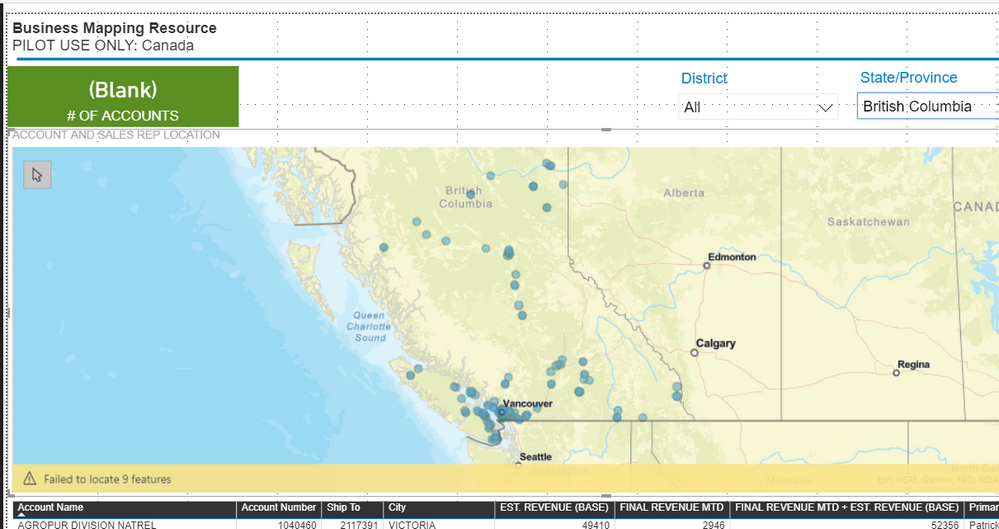
Please see screenshot of my mapped Accounts.
How do I add another point?
Solved! Go to Solution.
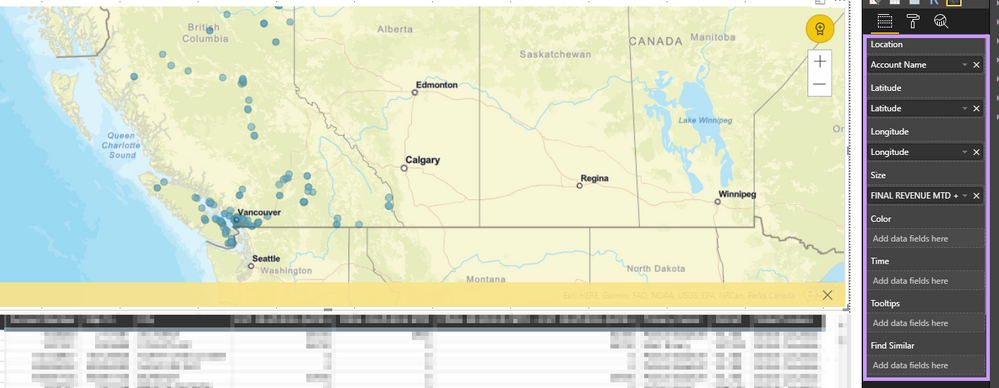
How is your data structured. In ArcGis, you can only use one set of Lat and Long. and If you use Lat and Long it overrides your location field for location mapping. It will use the location for colors/labels I think.
What map visual is that? It looks like you have quite a few points on that map...
It is the ARGGIS Map visual. The points I already have are for our Accounts. I need to have a point for the Sales Rep as well.
I cannot figure out how to get both mapped.
This is how I have the visual filtered.
How is your data structured. In ArcGis, you can only use one set of Lat and Long. and If you use Lat and Long it overrides your location field for location mapping. It will use the location for colors/labels I think.
The Power BI Data Visualization World Championships is back! Get ahead of the game and start preparing now!
| User | Count |
|---|---|
| 38 | |
| 36 | |
| 33 | |
| 32 | |
| 29 |
| User | Count |
|---|---|
| 129 | |
| 88 | |
| 79 | |
| 68 | |
| 63 |