Learn from the best! Meet the four finalists headed to the FINALS of the Power BI Dataviz World Championships! Register now
Hello,
I have the data I want to use that includes the percenatges for department scores for each department. I want to use those exact numbers in PowerBI, but instead it sums all the percentages and now it is inaccurate. I took off "Do not summarize" I still can't select it to show me only the numbers I already have. Makes sense? I hope I explained this well.
Solved! Go to Solution.
Hi @Anonymous ,
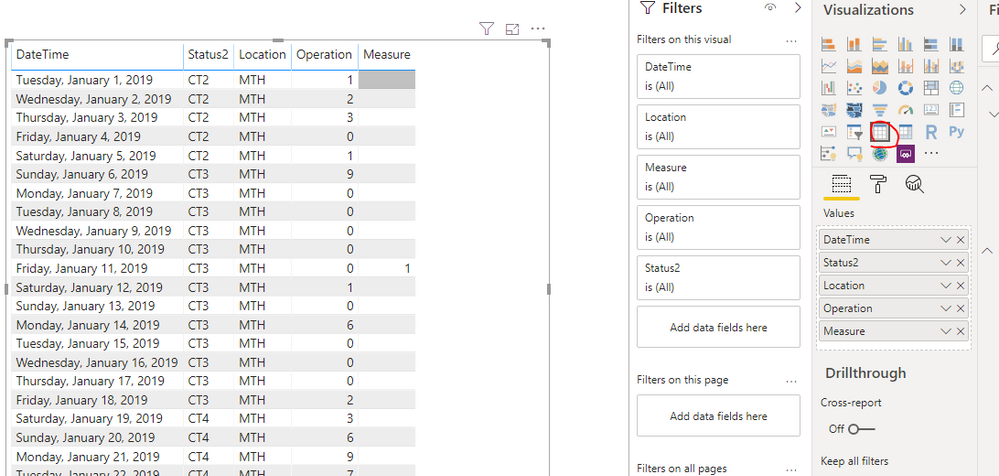
Choose the visual, then change the visual to table directly in the Visualizations Pane.
After that, set all the values don't summarize.
Oh yes. I did that and when I switched it back to the line chart it just turned into count. But when I selected min that seemed to work and get me the correct numbers.
Thank you for your help!!
@Anonymous first not sure why you are using matrix visual, use table visual and then select don't aggregate.
Subscribe to the @PowerBIHowTo YT channel for an upcoming video on List and Record functions in Power Query!!
Learn Power BI and Fabric - subscribe to our YT channel - Click here: @PowerBIHowTo
If my solution proved useful, I'd be delighted to receive Kudos. When you put effort into asking a question, it's equally thoughtful to acknowledge and give Kudos to the individual who helped you solve the problem. It's a small gesture that shows appreciation and encouragement! ❤
Did I answer your question? Mark my post as a solution. Proud to be a Super User! Appreciate your Kudos 🙂
Feel free to email me with any of your BI needs.
Hi,
I had no idea I was using a different visual. How do I change this? I do not see those options.
Hi @Anonymous ,
Choose the visual, then change the visual to table directly in the Visualizations Pane.
After that, set all the values don't summarize.
Oh yes. I did that and when I switched it back to the line chart it just turned into count. But when I selected min that seemed to work and get me the correct numbers.
Thank you for your help!!
| User | Count |
|---|---|
| 59 | |
| 47 | |
| 31 | |
| 18 | |
| 17 |
| User | Count |
|---|---|
| 77 | |
| 66 | |
| 46 | |
| 22 | |
| 22 |