This time we’re going bigger than ever. Fabric, Power BI, SQL, AI and more. We're covering it all. You won't want to miss it.
Learn moreDid you hear? There's a new SQL AI Developer certification (DP-800). Start preparing now and be one of the first to get certified. Register now
Below is the Input
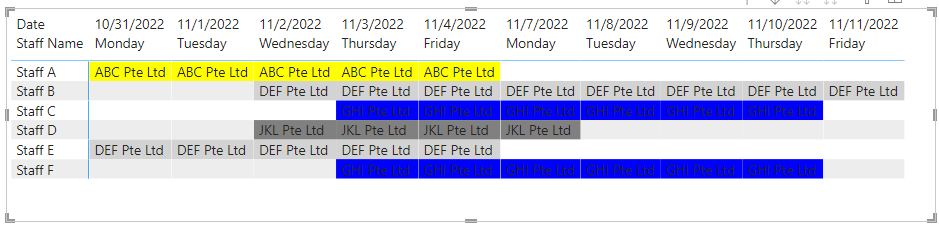
Below is the Output
Would this even be possible using Power Query?
Solved! Go to Solution.
Hi, @Anonymous
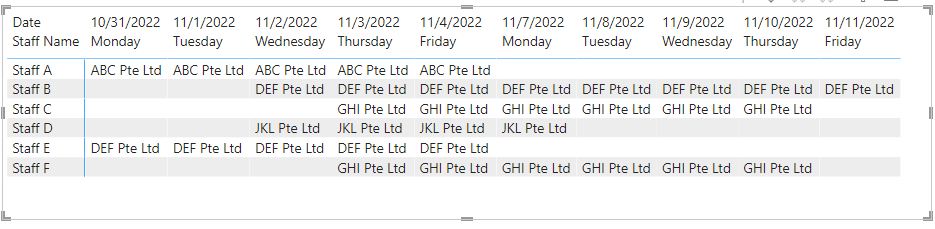
In the matrix view of Desktop, you can output the results you expect.
Column:
End Date = [Start Date]+[Days Booked]
Create a new date table.
Date = CALENDAR(MIN('Table'[Start Date]),MAX('Table'[End Date]))
Column:
Weekday = FORMAT([Date],"dddd")
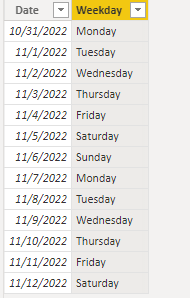
Measure =
IF (
SELECTEDVALUE ( 'Date'[Weekday] ) = "Saturday",
BLANK(),
IF (
SELECTEDVALUE ( 'Date'[Weekday] ) = "Sunday",
BLANK(),
CALCULATE (
MAX ( 'Table'[Project Name] ),
FILTER (
ALL ( 'Table' ),
[Start Date] <= SELECTEDVALUE ( 'Date'[Date] )
&& [End Date] >= SELECTEDVALUE ( 'Date'[Date] )
&& [Staff Name] = SELECTEDVALUE ( 'Table'[Staff Name] )
)
)
)
)
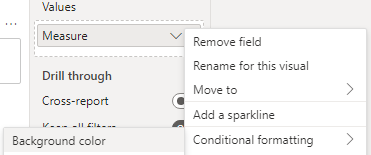
Measure:
Color = SWITCH(TRUE(),
SELECTEDVALUE('Table'[Project Name])="ABC Pte Ltd","Yellow",
SELECTEDVALUE('Table'[Project Name])="DEF Pte Ltd","light gray",
SELECTEDVALUE('Table'[Project Name])="GHI Pte Ltd","blue",
SELECTEDVALUE('Table'[Project Name])="JKL Pte Ltd","gray")
Is this the result you expect?
Best Regards,
Community Support Team _Charlotte
If this post helps, then please consider Accept it as the solution to help the other members find it more quickly.
Hi, @Anonymous
In the matrix view of Desktop, you can output the results you expect.
Column:
End Date = [Start Date]+[Days Booked]
Create a new date table.
Date = CALENDAR(MIN('Table'[Start Date]),MAX('Table'[End Date]))
Column:
Weekday = FORMAT([Date],"dddd")
Measure =
IF (
SELECTEDVALUE ( 'Date'[Weekday] ) = "Saturday",
BLANK(),
IF (
SELECTEDVALUE ( 'Date'[Weekday] ) = "Sunday",
BLANK(),
CALCULATE (
MAX ( 'Table'[Project Name] ),
FILTER (
ALL ( 'Table' ),
[Start Date] <= SELECTEDVALUE ( 'Date'[Date] )
&& [End Date] >= SELECTEDVALUE ( 'Date'[Date] )
&& [Staff Name] = SELECTEDVALUE ( 'Table'[Staff Name] )
)
)
)
)
Measure:
Color = SWITCH(TRUE(),
SELECTEDVALUE('Table'[Project Name])="ABC Pte Ltd","Yellow",
SELECTEDVALUE('Table'[Project Name])="DEF Pte Ltd","light gray",
SELECTEDVALUE('Table'[Project Name])="GHI Pte Ltd","blue",
SELECTEDVALUE('Table'[Project Name])="JKL Pte Ltd","gray")
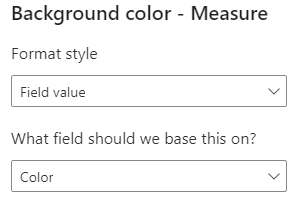
Is this the result you expect?
Best Regards,
Community Support Team _Charlotte
If this post helps, then please consider Accept it as the solution to help the other members find it more quickly.
Thanks so much!
@Anonymous
You should try Gantt Chart, which you will get in Power BI in Get more visuals Section.
Check out the April 2026 Power BI update to learn about new features.
Sign up to receive a private message when registration opens and key events begin.
If you have recently started exploring Fabric, we'd love to hear how it's going. Your feedback can help with product improvements.
| User | Count |
|---|---|
| 35 | |
| 32 | |
| 25 | |
| 23 | |
| 16 |
| User | Count |
|---|---|
| 65 | |
| 50 | |
| 30 | |
| 23 | |
| 23 |