cancel
Showing results for 
Search instead for 
Did you mean: 

We've captured the moments from FabCon & SQLCon that everyone is talking about, and we are bringing them to the community, live and on-demand. Starts on April 14th. Register now

Reply
lattys
Frequent Visitor

Power Query recursive

Hello!


I have a question. How can I make a Table in Query Editor that can append another table to itself with every data refresh?

At first my Table is blank, after it justs put the new data after the old ones. Tha new data is coming from an Oracle Database and it's formatted and summed at the right places, and it has numeric, text and date types (with the exact same column names from the other table)


I have this so far: 

let
    Source = Table.FromRows(Json.Document(Binary.Decompress(Binary.FromText("i44FAA==", BinaryEncoding.Base64), Compression.Deflate)), let _t = ((type text) meta [Serialized.Text = true]) in type table [Date = _t, #"LINK CODE" = _t, #"SUM RAM" = _t, #"SUM HDD" = _t, #"SUM CPU" = _t, #"SUM BEVETEL" = _t, Column1 = _t]),
    #"Changed Type" = Table.TransformColumnTypes(Source,{{"Date", type text}, {"LINK CODE", type text}, {"SUM RAM", type text}, {"SUM HDD", type text}, {"SUM CPU", type text}, {"SUM BEVETEL", type text}, {"Column1", type text}}),
    #"Renamed Columns" = Table.RenameColumns(#"Changed Type",{{"Column1", "Csomag"}}),
   // #"filled" = Table.InsertRows(#"Renamed Columns", rowCount_heti, Query1)    
    #"TableCombine" = Table.Combine({#"Renamed Columns", Ossz })
in 
   #"TableCombine"


But I have a strong feeling it will only put the last ones to the table.


I really hope that someone can help.

Thank you 

3 REPLIES 3
v-yulgu-msft
Microsoft Employee
Microsoft Employee

Hi @lattys,


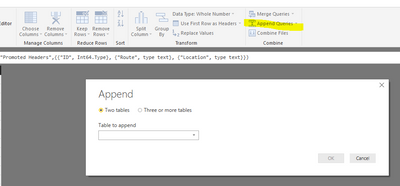
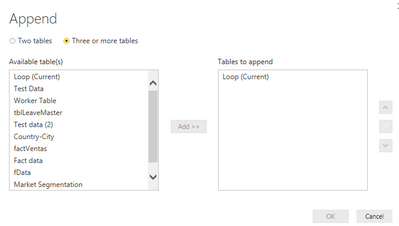
To append multiple tables with same table structure, a easy way is to use "Append query" option in Query Editor mode.

1.PNG2.PNG


Regards,

Yuliana Gu

Community Support Team _ Yuliana Gu
If this post helps, then please consider Accept it as the solution to help the other members find it more quickly.

Thank you, but I can't use this, at least I don't think so. I need to repetedly add the fresh aggregated dates so it can expand with newer elements. 


But I think I may be able to do this only from the servers (oracle) using some sql, it just would have been easier to edit it in Power Bi. 

Hey i'm running into the exact same issue. Did you find a way to solve this?

Helpful resources

Announcements
New to Fabric survey Carousel

New to Fabric Survey

If you have recently started exploring Fabric, we'd love to hear how it's going. Your feedback can help with product improvements.

Power BI DataViz World Championships carousel

Power BI DataViz World Championships - June 2026

A new Power BI DataViz World Championship is coming this June! Don't miss out on submitting your entry.

Join our Fabric User Panel

Join our Fabric User Panel

Share feedback directly with Fabric product managers, participate in targeted research studies and influence the Fabric roadmap.