Join us at FabCon Vienna from September 15-18, 2025
The ultimate Fabric, Power BI, SQL, and AI community-led learning event. Save €200 with code FABCOMM.
Get registered- Power BI forums
- Get Help with Power BI
- Desktop
- Service
- Report Server
- Power Query
- Mobile Apps
- Developer
- DAX Commands and Tips
- Custom Visuals Development Discussion
- Health and Life Sciences
- Power BI Spanish forums
- Translated Spanish Desktop
- Training and Consulting
- Instructor Led Training
- Dashboard in a Day for Women, by Women
- Galleries
- Data Stories Gallery
- Themes Gallery
- Contests Gallery
- Quick Measures Gallery
- Notebook Gallery
- Translytical Task Flow Gallery
- TMDL Gallery
- R Script Showcase
- Webinars and Video Gallery
- Ideas
- Custom Visuals Ideas (read-only)
- Issues
- Issues
- Events
- Upcoming Events
Compete to become Power BI Data Viz World Champion! First round ends August 18th. Get started.
- Power BI forums
- Forums
- Get Help with Power BI
- Desktop
- Re: Power Query only - Join on Range of Dates
- Subscribe to RSS Feed
- Mark Topic as New
- Mark Topic as Read
- Float this Topic for Current User
- Bookmark
- Subscribe
- Printer Friendly Page

- Mark as New
- Bookmark
- Subscribe
- Mute
- Subscribe to RSS Feed
- Permalink
- Report Inappropriate Content
Power Query only - Join on Range of Dates
Power Query only
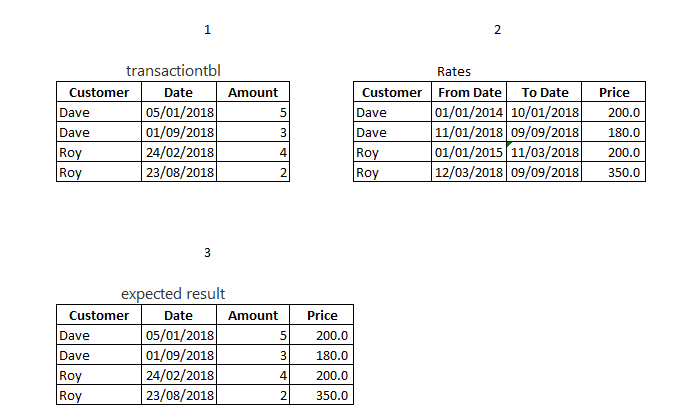
Hi , i am trying to add to my transaction table , the price from the price list.
transactiontbl:
Customer, Date, Amount
PriceListtbl:
[From Date],[To Date],[Customer],[Price]
Thanks a head,
Solved! Go to Solution.


- Mark as New
- Bookmark
- Subscribe
- Mute
- Subscribe to RSS Feed
- Permalink
- Report Inappropriate Content
hi,@Veritas_D
it is the M code in the advanced editor in power query of power bi
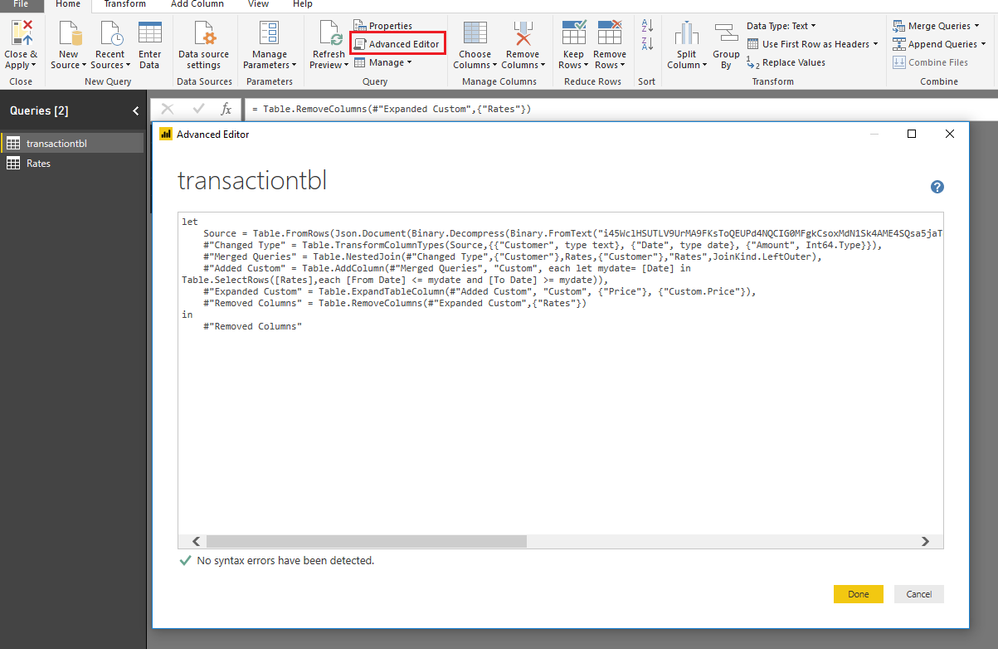
you can paste this code in it,
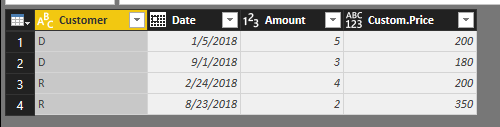
By the way , these steps in the power query are:
step1.Merge table transactiontbl with table Rates
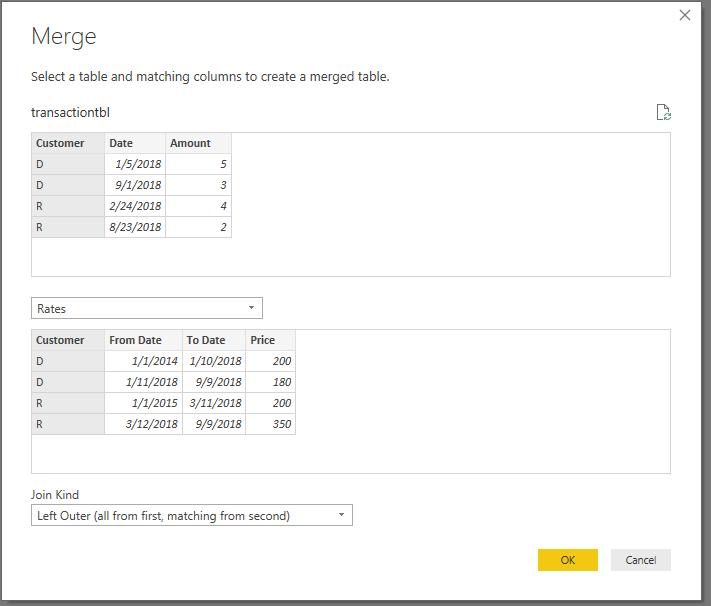
step2.add a custom column
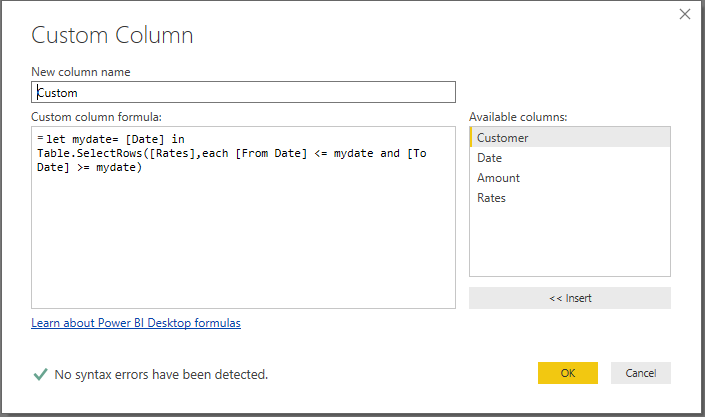
Step3:
Expand column
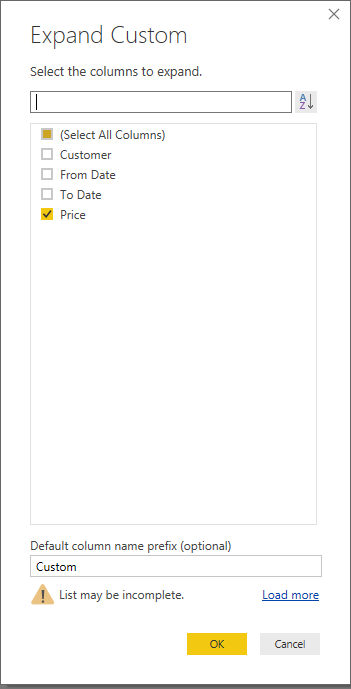
Step4:Remove the column and result:
Best Regards,
Lin
If this post helps, then please consider Accept it as the solution to help the other members find it more quickly.
- Mark as New
- Bookmark
- Subscribe
- Mute
- Subscribe to RSS Feed
- Permalink
- Report Inappropriate Content
hi,@Veritas_D
it is the M code in the advanced editor in power query of power bi
you can paste this code in it,
By the way , these steps in the power query are:
step1.Merge table transactiontbl with table Rates
step2.add a custom column
Step3:
Expand column
Step4:Remove the column and result:
Best Regards,
Lin
If this post helps, then please consider Accept it as the solution to help the other members find it more quickly.


- Mark as New
- Bookmark
- Subscribe
- Mute
- Subscribe to RSS Feed
- Permalink
- Report Inappropriate Content
@Anonymous
Could you copy paste few rows of sample data with expected results?
Regards
Zubair
Please try my custom visuals
- Mark as New
- Bookmark
- Subscribe
- Mute
- Subscribe to RSS Feed
- Permalink
- Report Inappropriate Content
- Mark as New
- Bookmark
- Subscribe
- Mute
- Subscribe to RSS Feed
- Permalink
- Report Inappropriate Content
@Anonymous
You can use this
let
    Source = Excel.CurrentWorkbook(){[Name="transactiontbl"]}[Content],
    #"Changed Type" = Table.TransformColumnTypes(Source,{{"Customer", type text}, {"Date", type datetime}, {"Amount", Int64.Type}}),
    #"Merged Queries" = Table.NestedJoin(#"Changed Type",{"Customer"},Rates,{"Customer"},"Rates",JoinKind.LeftOuter),
    #"Added Custom" = Table.AddColumn(#"Merged Queries", "Custom", each let mydate= [Date] in
Table.SelectRows([Rates],each [From Date] <= mydate and [To Date] >= mydate)),
    #"Expanded Custom" = Table.ExpandTableColumn(#"Added Custom", "Custom", {"Price"}, {"Custom.Price"}),
    #"Removed Columns" = Table.RemoveColumns(#"Expanded Custom",{"Rates"})
in
    #"Removed Columns"
Regards
Zubair
Please try my custom visuals
- Mark as New
- Bookmark
- Subscribe
- Mute
- Subscribe to RSS Feed
- Permalink
- Report Inappropriate Content
Thank you, but i meant power query of power bi
- Mark as New
- Bookmark
- Subscribe
- Mute
- Subscribe to RSS Feed
- Permalink
- Report Inappropriate Content
@Anonymous
Please see attached Excel File for the Steps
Regards
Zubair
Please try my custom visuals
Helpful resources

Fabric Community Update - July 2025
Find out what's new and trending in the Fabric community.

Power BI Monthly Update - July 2025
Check out the July 2025 Power BI update to learn about new features.

| User | Count |
|---|---|
| 87 | |
| 84 | |
| 36 | |
| 35 | |
| 32 |


| User | Count |
|---|---|
| 96 | |
| 75 | |
| 67 | |
| 52 | |
| 52 |


