This time we’re going bigger than ever. Fabric, Power BI, SQL, AI and more. We're covering it all. You won't want to miss it.
Learn moreDid you hear? There's a new SQL AI Developer certification (DP-800). Start preparing now and be one of the first to get certified. Register now
Power query in PBI, I am trying to find and replace a value that has a return in a cell. I am trying to replace the value with just the employees name.
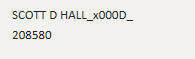
I need it to go from SCOTT D HALL_x000D_ 208580 to just Scott Hall....also his name placement may change each month so how do I have power query recongize his name is in another location and modifies that information?
Solved! Go to Solution.
Generally, you can splite the column by custom separator like " " and "_", then remove the useless columns and combine the two left columns.
Or you can regular expreesion to match the pattern using python or R.
Community Support Team _ Jimmy Tao
If this post helps, then please consider Accept it as the solution to help the other members find it more quickly.
Generally, you can splite the column by custom separator like " " and "_", then remove the useless columns and combine the two left columns.
Or you can regular expreesion to match the pattern using python or R.
Community Support Team _ Jimmy Tao
If this post helps, then please consider Accept it as the solution to help the other members find it more quickly.
Check out the April 2026 Power BI update to learn about new features.
Sign up to receive a private message when registration opens and key events begin.
If you have recently started exploring Fabric, we'd love to hear how it's going. Your feedback can help with product improvements.
| User | Count |
|---|---|
| 34 | |
| 31 | |
| 30 | |
| 21 | |
| 16 |
| User | Count |
|---|---|
| 62 | |
| 51 | |
| 31 | |
| 23 | |
| 23 |