cancel
Showing results for 
Search instead for 
Did you mean: 

Get Fabric Certified for FREE during Fabric Data Days. Don't miss your chance! Request now

Reply
ovetteabejuela
Impactful Individual

Power Query: Where and When to Apply Steps Where

Hi,


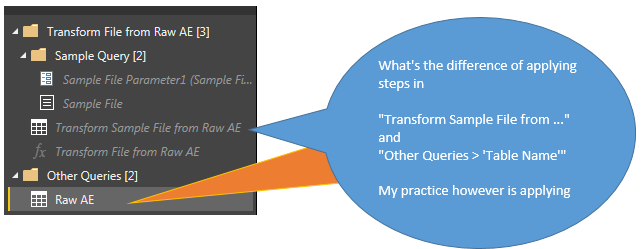
With reference to the screenshot below, when do I do data cleansing in either part of the query, I am looking into a folder with either a csv or xlsx source.


ApplySteps.PNG

1 ACCEPTED SOLUTION
MarcelBeug
Community Champion
Community Champion

In the Transform Sample file query, you can specify the steps that will be applied to each individual source file.

That would be the prefered place to do data cleansing.

Exception: when you specify the data types in this query, these will (or may?) get lost when the tables are expanded in the main query.


However, some transformations may not be possible until all data is combined in 1 table, e.g. an overall sort.

Those steps should be added to the main query (i.c. Raw AE).

And of course any data type setting.


Specializing in Power Query Formula Language (M)

View solution in original post

2 REPLIES 2
MarcelBeug
Community Champion
Community Champion

In the Transform Sample file query, you can specify the steps that will be applied to each individual source file.

That would be the prefered place to do data cleansing.

Exception: when you specify the data types in this query, these will (or may?) get lost when the tables are expanded in the main query.


However, some transformations may not be possible until all data is combined in 1 table, e.g. an overall sort.

Those steps should be added to the main query (i.c. Raw AE).

And of course any data type setting.


Specializing in Power Query Formula Language (M)

Thanks for confirming that, that is how I see it as well I am just not as confident if I am correct. I am more comfortable and confident with how I'm doing it now.

Helpful resources

Announcements
November Power BI Update Carousel

Power BI Monthly Update - November 2025

Check out the November 2025 Power BI update to learn about new features.

Fabric Data Days Carousel

Fabric Data Days

Advance your Data & AI career with 50 days of live learning, contests, hands-on challenges, study groups & certifications and more!

FabCon Atlanta 2026 carousel

FabCon Atlanta 2026

Join us at FabCon Atlanta, March 16-20, for the ultimate Fabric, Power BI, AI and SQL community-led event. Save $200 with code FABCOMM.

Top Solution Authors
Top Kudoed Authors