
cancel
Showing results for 
Search instead for 
Did you mean: 

July 7 - July 17 | Round 2 of the Power BI Dataviz World Championships. Don't miss your chance! Learn more

Reply
jcarrier
Helper I
Helper I

Power Query - Variable Row to Standardized Column Layout

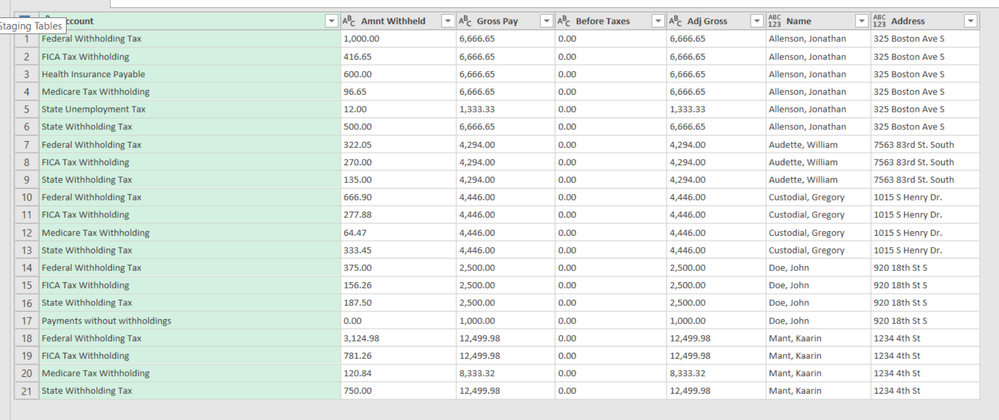
I want to tranform the snapshot below with variable row to standardized column layout. This needs to be a Power Query solution. The desired layout is one name and address with respective accounts and values for each row. Any help is appreciated on this. Thanks!


2019-04-14_16-37-14.png


Desired Layout:

Name / Address / Account1 / Cat1 / Cat2 / Cat3 / Cat4 / and so on...

Name1 / Address1 / Same Account1 / Value1a  / Value 1b / Value1c / Value1d / and so on...

Name2 / Address2 / Same Account1 / Value1a  / Value 1b / Value1c / Value1d / and so on...

1 ACCEPTED SOLUTION

Here is the solve on this.  It's slightly modified from the desired table above as it does not have the placeholder Account columns but the respective Account columns are easily identifiable.  The key is to merge the values columns by a unique delimliter, pivot, and split columns by same delimiter.  Just have to think about data differently a bit.

View solution in original post

3 REPLIES 3
parry2k
Super User
Super User

@jcarrier sorry not fully sure about your requirement, can you explain further in detail.


Subscribe to the @PowerBIHowTo YT channel for an upcoming video on List and Record functions in Power Query!!

Learn Power BI and Fabric - subscribe to our YT channel - Click here: @PowerBIHowTo

If my solution proved useful, I'd be delighted to receive Kudos. When you put effort into asking a question, it's equally thoughtful to acknowledge and give Kudos to the individual who helped you solve the problem. It's a small gesture that shows appreciation and encouragement! ❤


Did I answer your question? Mark my post as a solution. Proud to be a Super User! Appreciate your Kudos 🙂
Feel free to email me with any of your BI needs.

The layout has to be standardized regardless of the number of variable accounts for each name.  Here is a truncated snapshot of the desired layout.  Hope that helps.


2019-04-14_19-54-02.png

Here is the solve on this.  It's slightly modified from the desired table above as it does not have the placeholder Account columns but the respective Account columns are easily identifiable.  The key is to merge the values columns by a unique delimliter, pivot, and split columns by same delimiter.  Just have to think about data differently a bit.

Helpful resources

Announcements
FabCon and SQLCon Barcelona 2026

FabCon & SQLCon – Barcelona 2026

Join us in Barcelona for FabCon and SQLCon, the Fabric, Power BI, SQL, and AI community event. Save €200 with code FABCMTY200.

60 days of Data Days Carousel

Data Days 2026

Join Data Days 2026: 60 days of free live/on-demand sessions, challenges, study groups, and certification opportunities.

Power BI DataViz World Championships carousel

Power BI DataViz World Championships - June 2026

A new Power BI DataViz World Championship is coming this June! Don't miss out on submitting your entry.

Top Solution Authors