Share feedback directly with Fabric product managers, participate in targeted research studies and influence the Fabric roadmap.
Sign up nowGet Fabric certified for FREE! Don't miss your chance! Learn more
Solved! Go to Solution.
Select the Column > Add Column > Time > Minutes then repeat for Hours.
Does the time period exceed 24 hrs?
just as an example....
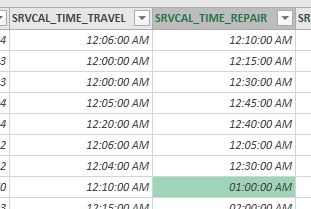
on the 1st row the travel value is 6 minutes and the repair time is 10 minutes. Originally 00:06 and 00:10 respectively.
However on the highlighted cell, the repair time is 1 hour. Originally 01:00
Thank you
Hi,
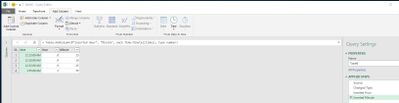
my understanding is that PQ is automatically detecting the column type and setting it to "Date/Time". Given that you are interested in displaying the data in those columns as duration you can simply click on the column and from the ribbon or the context menu change the data type to "Duration".
Select the Column > Add Column > Time > Minutes then repeat for Hours.
Does the time period exceed 24 hrs?
Share feedback directly with Fabric product managers, participate in targeted research studies and influence the Fabric roadmap.
| User | Count |
|---|---|
| 68 | |
| 59 | |
| 44 | |
| 19 | |
| 15 |
| User | Count |
|---|---|
| 108 | |
| 105 | |
| 37 | |
| 26 | |
| 26 |