This is best Fabric, Power BI, SQL and AI community event. How do we know? The last event sold out! Save €200 with code FABCMTY200.
Register nowA new Data Days event is coming soon! This time we’re going bigger than ever. Fabric, Power BI, SQL, AI and more. Don't miss out.
Solved! Go to Solution.
Select the Column > Add Column > Time > Minutes then repeat for Hours.
Does the time period exceed 24 hrs?
just as an example....
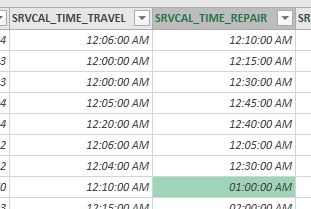
on the 1st row the travel value is 6 minutes and the repair time is 10 minutes. Originally 00:06 and 00:10 respectively.
However on the highlighted cell, the repair time is 1 hour. Originally 01:00
Thank you
Hi,
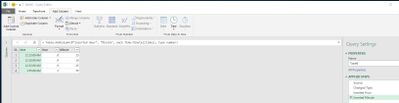
my understanding is that PQ is automatically detecting the column type and setting it to "Date/Time". Given that you are interested in displaying the data in those columns as duration you can simply click on the column and from the ribbon or the context menu change the data type to "Duration".
Select the Column > Add Column > Time > Minutes then repeat for Hours.
Does the time period exceed 24 hrs?
Check out the May 2026 Power BI update to learn about new features.
Sign up to receive a private message when registration opens and key events begin.
If you have recently started exploring Fabric, we'd love to hear how it's going. Your feedback can help with product improvements.
| User | Count |
|---|---|
| 27 | |
| 25 | |
| 25 | |
| 21 | |
| 14 |
| User | Count |
|---|---|
| 51 | |
| 46 | |
| 23 | |
| 18 | |
| 18 |