Don't miss your chance to take the Fabric Data Engineer (DP-600) exam for FREE! Find out how by watching the DP-600 session on-demand now through April 28th.
Learn moreJoin the FabCon + SQLCon recap series. Up next: Power BI, Real-Time Intelligence, IQ and AI, and Data Factory take center stage. All sessions are available on-demand after the live show. Register now
hi,
When I use this in my Power Query:
[createdon] + #duration(0,10,0,0)
I get a value that is returned as type 'Any'. The value looks like :
| 4/08/2018 6:45:24 AM +00:00 |
How do I convert this to DateTime in a single line in Power Query without adding another column, splitting the date time value to a text and then converting it Date Time?
Hi @Anonymous ,
Could you please tell me if your problem has been solved? If it is, could you please mark the helpful replies as Answered to close this topic?
Regards,
Daniel He
Hi,
Thanks for getting back to me.
Not resolved.
At the moment I have a long winded bunch of steps that will split a text date time field by the '+' delimiter and then remove the rest of the unwanted columns - hardly an elegant solution.
#"Added CreatedOnAEST" = Table.AddColumn(#"Changed Type", "CreatedOnAEST", each if DSTQuery([CreatedOnUTC]) = 1 then [createdon] + #duration(0,10,0,0) else [createdon] + #duration(0,11,0,0)),
#"Split Column by Delimiter" = Table.SplitColumn(Table.TransformColumnTypes(#"Added CreatedOnAEST", {{"CreatedOnAEST", type text}}, "en-AU"), "CreatedOnAEST", Splitter.SplitTextByDelimiter("+", QuoteStyle.Csv), {"CreatedOnAEST.1", "CreatedOnAEST.2"}),
#"Changed Type1" = Table.TransformColumnTypes(#"Split Column by Delimiter",{{"CreatedOnAEST.1", type datetime}, {"CreatedOnAEST.2", type time}}),
#"Removed Columns1" = Table.RemoveColumns(#"Changed Type1",{"CreatedOnAEST.2"}),
#"Renamed Columns1" = Table.RenameColumns(#"Removed Columns1",{{"CreatedOnAEST.1", "CreatedOnAEST"}})
So is it possible to put this in a function and then call it Power Query?
Hi @Anonymous ,
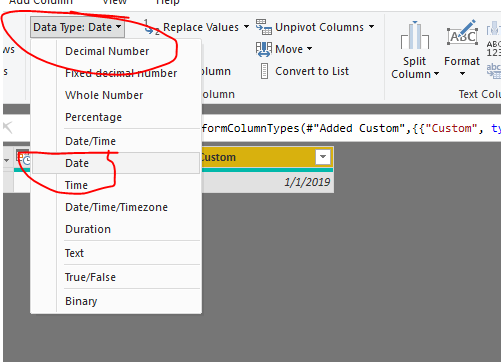
Could you have just tried to change the data type to "Date":
Regards,
Daniel He
Check out the April 2026 Power BI update to learn about new features.
If you have recently started exploring Fabric, we'd love to hear how it's going. Your feedback can help with product improvements.
A new Power BI DataViz World Championship is coming this June! Don't miss out on submitting your entry.
| User | Count |
|---|---|
| 43 | |
| 38 | |
| 35 | |
| 21 | |
| 15 |
| User | Count |
|---|---|
| 65 | |
| 58 | |
| 28 | |
| 27 | |
| 25 |