This time we’re going bigger than ever. Fabric, Power BI, SQL, AI and more. We're covering it all. You won't want to miss it.
Learn moreDid you hear? There's a new SQL AI Developer certification (DP-800). Start preparing now and be one of the first to get certified. Register now
Hi,
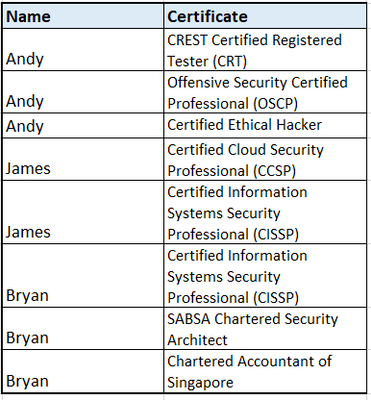
I have a table that looks like this right now:
Some of the certificates name has short forms while others dont. I want to create a new column in power query which only take the texts in the bracket. For the certificate that does not has any shortform in the brackets, i want it to show the full name in the new column. I have to do it in power query (something that im still learning)
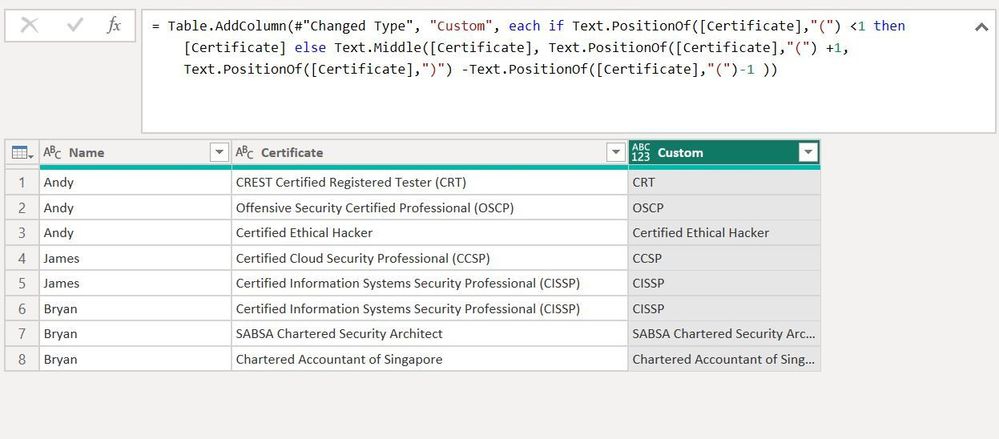
What i want my table to look like is this:
This is the file: https://drive.google.com/drive/folders/1ojdvJSwOLTcF7c_e58bNLjeUo92aQO_O?usp=share_link
Thank you, Appreciate the help I'm getting.
Solved! Go to Solution.
@Anonymous
you can try this
if Text.PositionOf([certificate],"(") <1 then [certificate] else Text.Middle([certificate], Text.PositionOf([certificate],"(") +1,Text.PositionOf([certificate],")") -Text.PositionOf([certificate],"(")-1 )
Proud to be a Super User!
Hi @Anonymous
Try the above formula by changing the "c" on certificate as "C" it works and give you the result that you are looking for.
Re-sharing the command again here with update :
= Table.AddColumn(#"Changed Type", "Custom", each if Text.PositionOf([Certificate],"(") <1 then [Certificate] else Text.Middle([Certificate], Text.PositionOf([Certificate],"(") +1,Text.PositionOf([Certificate],")") -Text.PositionOf([Certificate],"(")-1 ))
@Anonymous
you can try this
if Text.PositionOf([certificate],"(") <1 then [certificate] else Text.Middle([certificate], Text.PositionOf([certificate],"(") +1,Text.PositionOf([certificate],")") -Text.PositionOf([certificate],"(")-1 )
Proud to be a Super User!
Check out the April 2026 Power BI update to learn about new features.
Sign up to receive a private message when registration opens and key events begin.
If you have recently started exploring Fabric, we'd love to hear how it's going. Your feedback can help with product improvements.
| User | Count |
|---|---|
| 34 | |
| 31 | |
| 30 | |
| 21 | |
| 16 |
| User | Count |
|---|---|
| 61 | |
| 50 | |
| 30 | |
| 23 | |
| 23 |