cancel
Showing results for 
Search instead for 
Did you mean: 

July 7 - July 17 | Round 2 of the Power BI Dataviz World Championships. Don't miss your chance! Learn more

Reply
Anonymous
Not applicable

Power Query: Folder: Multiple Excel Files : Extract creation date

Hello,


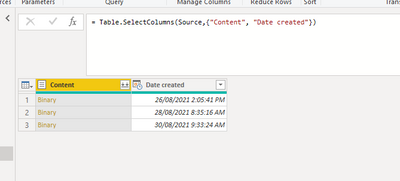
I am using Power Query Folder option as the data source which will have multiple excel files. All the excel files will be in same format with same header. I need to append all these records with a extra column "Creation Date" and add to the records.


KarthikKV_0-1630361276469.png


I am almost there but not sure how to merge date created column above with each file.


Thanks,

Karthik

2 ACCEPTED SOLUTIONS
mahoneypat
Microsoft Employee
Microsoft Employee

You can click on the double arrows on the Content column and use the Combine & Transform feature.  Or you can add a column with Excel.Workbook([Content]) to get a Table with the Excel contents, and then update that expression to drill in further.  For example, Excel.Workbook([Content]){0}[Data].


Pat


Did I answer your question? Mark my post as a solution! Kudos are also appreciated!

To learn more about Power BI, follow me on Twitter or subscribe on YouTube.


@mahoneypa HoosierBI on YouTube


View solution in original post

v-xulin-mstf
Community Support
Community Support

Hi @Anonymous,


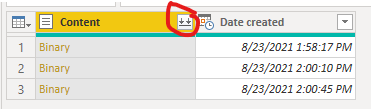
Click combine files:

vxulinmstf_1-1630566470203.png

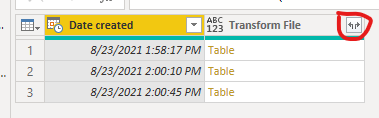
Expand the table:

vxulinmstf_2-1630566596782.png

vxulinmstf_3-1630566606643.png


If you still have some question, please don't hesitate to let me known.‌‌


Best Regards,

Link


Is that the answer you're looking for? If this post helps, then please consider Accept it as the solution. Really appreciate!


View solution in original post

3 REPLIES 3
Anonymous
Not applicable

Hello @v-xulin-mstf  / @mahoneypat ,


Both the solution works and thanks for the information. 


For anyone who is referring in future can click below link for more information.


https://anvari.net/Computers_Business/Highline%20Excel%202016%20Class%2021%20PQ%20to%20Import%20Mult...


Thanks,

Karthik

v-xulin-mstf
Community Support
Community Support

Hi @Anonymous,


Click combine files:

vxulinmstf_1-1630566470203.png

Expand the table:

vxulinmstf_2-1630566596782.png

vxulinmstf_3-1630566606643.png


If you still have some question, please don't hesitate to let me known.‌‌


Best Regards,

Link


Is that the answer you're looking for? If this post helps, then please consider Accept it as the solution. Really appreciate!


mahoneypat
Microsoft Employee
Microsoft Employee

You can click on the double arrows on the Content column and use the Combine & Transform feature.  Or you can add a column with Excel.Workbook([Content]) to get a Table with the Excel contents, and then update that expression to drill in further.  For example, Excel.Workbook([Content]){0}[Data].


Pat


Did I answer your question? Mark my post as a solution! Kudos are also appreciated!

To learn more about Power BI, follow me on Twitter or subscribe on YouTube.


@mahoneypa HoosierBI on YouTube


Helpful resources

Announcements
FabCon and SQLCon Barcelona 2026

FabCon & SQLCon – Barcelona 2026

Join us in Barcelona for FabCon and SQLCon, the Fabric, Power BI, SQL, and AI community event. Save €200 with code FABCMTY200.

60 days of Data Days Carousel

Data Days 2026

Join Fabric Data Days 2026: 60 days of free live/on-demand sessions, challenges, study groups, and certification opportunities.

Power BI DataViz World Championships carousel

Power BI DataViz World Championships - June 2026

A new Power BI DataViz World Championship is coming this June! Don't miss out on submitting your entry.