cancel
Showing results for 
Search instead for 
Did you mean: 

Learn from the best! Meet the four finalists headed to the FINALS of the Power BI Dataviz World Championships! Register now

Reply
vinothkumar1990
Helper II
Helper II

Power Query - Excel rows shift up

Hi All,

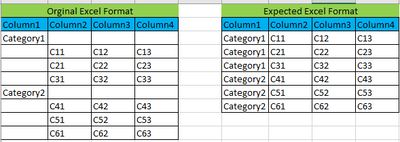
  I have a excel and i want to generate the report out it. The data population in the excel is some what different, so i want to convert them in my own format in Power BI. Refer the below example,


vinothkumar1990_1-1653040634800.png

Note: Due to some reason, we can't make any changes in excel .


Kinldy let me know if there is any way to do it in Power BI.


Thanks,

Vinoth

1 ACCEPTED SOLUTION
HotChilli
Community Champion
Community Champion

In the first column, you can 'replace values' on blank or "" with null (You want to get null in all those cells - apart from the legitimate values)

Then use 'Fill Down' on the first column.

Then Filter out the blank rows from column2 header 

View solution in original post

1 REPLY 1
HotChilli
Community Champion
Community Champion

In the first column, you can 'replace values' on blank or "" with null (You want to get null in all those cells - apart from the legitimate values)

Then use 'Fill Down' on the first column.

Then Filter out the blank rows from column2 header 

Helpful resources

Announcements
Join our Fabric User Panel

Join our Fabric User Panel

Share feedback directly with Fabric product managers, participate in targeted research studies and influence the Fabric roadmap.

February Power BI Update Carousel

Power BI Monthly Update - February 2026

Check out the February 2026 Power BI update to learn about new features.