cancel
Showing results for 
Search instead for 
Did you mean: 

The Power BI Data Visualization World Championships is back! Get ahead of the game and start preparing now! Learn more

Reply
tryan
Frequent Visitor

Power Query - Dynamic Parameters

Hi,


I created a query in Power Query that allows me to type certain parameters into a table in an Excel worksheet that dynamically passes into the query.  This query is pulling data from a SQL database.  The code is:


let
    Portfolio=Excel.CurrentWorkbook(){[Name="param"]}[Content]{0}[#"Portfolio"],
    Date=Excel.CurrentWorkbook(){[Name="param"]}[Content]{0}[#"Date"],
    Securities=Excel.CurrentWorkbook(){[Name="param"]}[Content]{0}[#"Securities"],
    MIS=Excel.CurrentWorkbook(){[Name="param"]}[Content]{0}[#"MIS"],
    Source = Sql.Database("Phlsql14clus01", "DW",
    [Query="exec [dbo].[SSRS_Holdings_Asof] '"
    & Number.ToText(Portfolio)
    & "', '"
    & Date
    & "', '"
    & Securities
    & "', '"
    & MIS
    & "'"])
in
    Source


This works perfectly fine for one set of parameters.  However, I want to pass multiple sets of parameters into the query at once.  For example, in the code above you can see that my paramters are "Portfolio", "Date", "Securities", and "MIS".  If I want to pull data for portfolio 2155 as of date 12/29/17 for all securities and MIS codes, I can set those parameters in my Excel table and Power Query will pull the data.  A picture of those paramters in my Excel table is below:
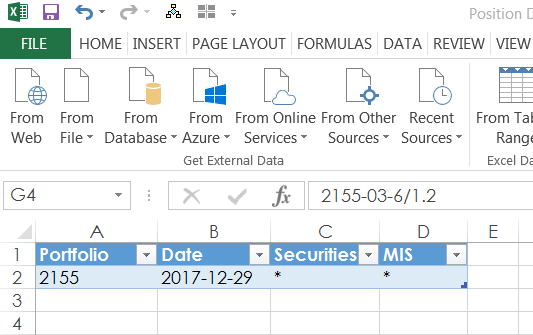
 

Capture.PNG


I would like to be able to add more rows to this table so that I could run a query to pull data for other specific portfolio numbers or other dates for the same portfolio (i.e. row 3 in the picture could have Portfolio 2155 with Date 11/30/17) all in one query.  I have succesfully done this manually with a query that specially types out each set of parameters and then appends them with something like:


let
    Source1 = Sql.Database("Phlsql14clus01", "DW", [Query="exec [dbo].[SSRS_Holdings_Asof] ""2155"",""12/29/17"",""*"",""*"""]),
    Source2 = Sql.Database("Phlsql14clus01", "DW", [Query="exec [dbo].[SSRS_Holdings_Asof] ""2155"",""11/30/17"",""*"",""*"""]),
    Source3 = Sql.Database("Phlsql14clus01", "DW", [Query="exec [dbo].[SSRS_Holdings_Asof] ""2155"",""10/31/17"",""*"",""*"""]),
    Source4 = Sql.Database("Phlsql14clus01", "DW", [Query="exec [dbo].[SSRS_Holdings_Asof] ""2155"",""9/30/17"",""*"",""*"""]),


#"Appended Query" = Table.Combine({Source1, Source2, Source3, Source4})

in
    #"Appended Query"


Where each Source has a specific set of parameters.  But I'd like to achieve that type of appending by using the table in Excel to feed the first query in my post.  I also want it to be dynamic enough so that I can add however many rows in the table I like (i.e. however many different sets of parameters I want to query in my data).

If anyone knows how to do so, can you offer edits I can make to the first query in my post?

1 ACCEPTED SOLUTION
Anonymous
Not applicable

HI @tryan,


Maybe you can try to use below formula.


Custom function sample:

let 
	GetData=(index as number)=>
let

        Datasource=Excel.CurrentWorkbook(){[Name="param"]}[Content],//source
        //paramtere
        Portfolio=Datasource{index}[#"Portfolio"],
        Date=Datasource{index}[#"Date"],
        Securities=Datasource{index}[#"Securities"],
        MIS=Datasource{index}[#"MIS"],
        //invoke
        Source = Sql.Database("Phlsql14clus01", "DW",
        [Query="exec [dbo].[SSRS_Holdings_Asof] '"
        & Number.ToText(Portfolio)
        & "', '"
        & Date
        & "', '"
        & Securities
        & "', '"
        & MIS
        & "'"])

in
    Source
in
    GetData

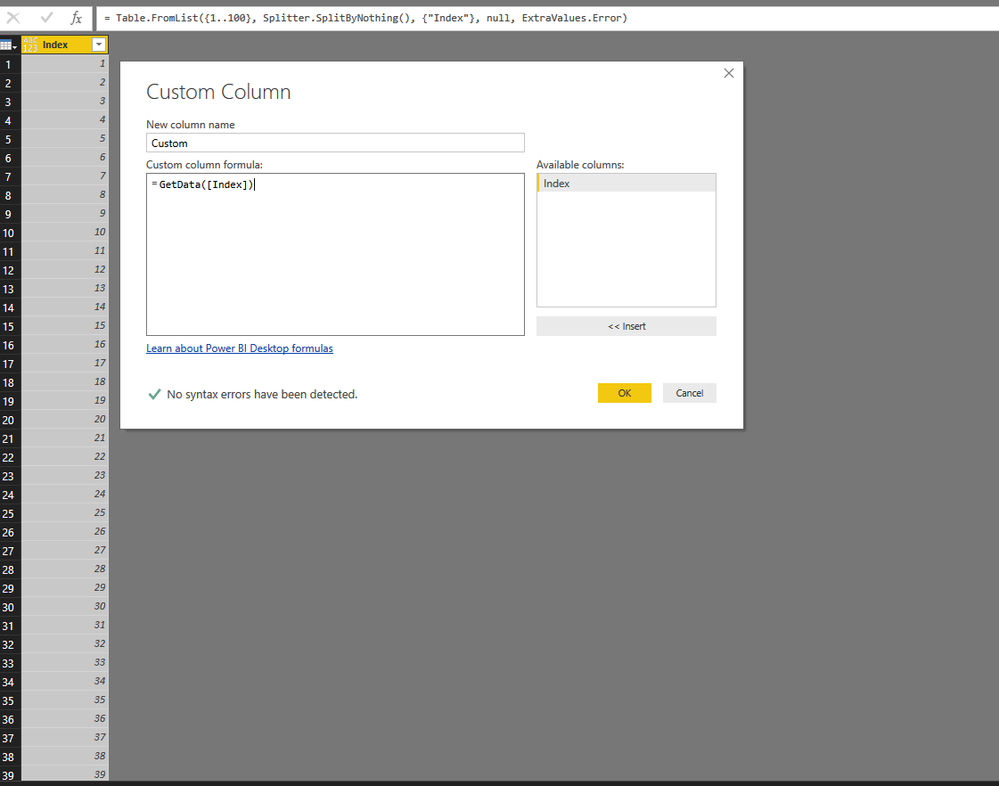
Create table with index to invoke custom function.

9.PNG


Regards,

Xiaoxin Sheng


View solution in original post

3 REPLIES 3
Anonymous
Not applicable

HI @tryan,


>>However, I want to pass multiple sets of parameters into the query at once.  

I don't think it is simply to achieve.  In my opinion, I'd like to suggest you store these connections to other file and use power query to load data.


After finish loading, you can write and invoke custom function to loop though above table to get data from other sources.
Then merge them as one table.


Sample custom function input parameter and return table:

let
    LoadData=(portfolio as text , date as text,optional securities as text, optional mis as text) as table =>
    let
        Security = if securities <> null then securities else "*",
        MIS = if mis <> null then mis else "*",
        Source = Sql.Database("Phlsql14clus01", "DW", [Query="exec [dbo].[SSRS_Holdings_Asof] " &portfolio& "," &date& ","&Security&","&MIS])
    in
        Source
in 
    LoadData


Regards,

Xiaoxin Sheng

That doesn't seem to work too well for what I want.  I did find something new though.  The highlighed red 0's below are what control which row of the table pulls into the query. 


let

        Portfolio=Excel.CurrentWorkbook(){[Name="param"]}[Content]{0}[#"Portfolio"],
        Date=Excel.CurrentWorkbook(){[Name="param"]}[Content]{0}[#"Date"],
        Securities=Excel.CurrentWorkbook(){[Name="param"]}[Content]{0}[#"Securities"],
        MIS=Excel.CurrentWorkbook(){[Name="param"]}[Content]{0}[#"MIS"],
        Source = Sql.Database("Phlsql14clus01", "DW",
        [Query="exec [dbo].[SSRS_Holdings_Asof] '"
        & Number.ToText(Portfolio)
        & "', '"
        & Date
        & "', '"
        & Securities
        & "', '"
        & MIS
        & "'"])

in
Source


So for example, if I want to pull a set of paramters from the second row of my parameter table (my original post has a picture of what the paramter table looks like), I change the 0's to 1's.  If I want the third row, I change the 0's to 2's, and so forth.  I want to edit the code to something like below.  I would create some type of loop based on a count of the number of rows in my paramter table.  So if I have ten rows in my paramter table, I'm wondering if I can use something like List.Generate and table.RowCount to create a list from 0 to 9.  I would then pass each number into the i's below, and append each of the 10 different queries into one table.  Can anyone help me create something like that?


let

        Portfolio=Excel.CurrentWorkbook(){[Name="param"]}[Content]{i}[#"Portfolio"],
        Date=Excel.CurrentWorkbook(){[Name="param"]}[Content]{i}[#"Date"],
        Securities=Excel.CurrentWorkbook(){[Name="param"]}[Content]{i}[#"Securities"],
        MIS=Excel.CurrentWorkbook(){[Name="param"]}[Content]{i}[#"MIS"],
        Source = Sql.Database("Phlsql14clus01", "DW",
        [Query="exec [dbo].[SSRS_Holdings_Asof] '"
        & Number.ToText(Portfolio)
        & "', '"
        & Date
        & "', '"
        & Securities
        & "', '"
        & MIS
        & "'"])

in
Source

Anonymous
Not applicable

HI @tryan,


Maybe you can try to use below formula.


Custom function sample:

let 
	GetData=(index as number)=>
let

        Datasource=Excel.CurrentWorkbook(){[Name="param"]}[Content],//source
        //paramtere
        Portfolio=Datasource{index}[#"Portfolio"],
        Date=Datasource{index}[#"Date"],
        Securities=Datasource{index}[#"Securities"],
        MIS=Datasource{index}[#"MIS"],
        //invoke
        Source = Sql.Database("Phlsql14clus01", "DW",
        [Query="exec [dbo].[SSRS_Holdings_Asof] '"
        & Number.ToText(Portfolio)
        & "', '"
        & Date
        & "', '"
        & Securities
        & "', '"
        & MIS
        & "'"])

in
    Source
in
    GetData

Create table with index to invoke custom function.

9.PNG


Regards,

Xiaoxin Sheng


Helpful resources

Announcements
Power BI DataViz World Championships

Power BI Dataviz World Championships

The Power BI Data Visualization World Championships is back! Get ahead of the game and start preparing now!

December 2025 Power BI Update Carousel

Power BI Monthly Update - December 2025

Check out the December 2025 Power BI Holiday Recap!

FabCon Atlanta 2026 carousel

FabCon Atlanta 2026

Join us at FabCon Atlanta, March 16-20, for the ultimate Fabric, Power BI, AI and SQL community-led event. Save $200 with code FABCOMM.