cancel
Showing results for 
Search instead for 
Did you mean: 

The Power BI Data Visualization World Championships is back! Get ahead of the game and start preparing now! Learn more

Reply
MyPowerbi2020
Helper IV
Helper IV

Power Pivot Automation

Hi ,
I have couple of Power Pivot reports & need to automate these. Below are the requirements:

1. Automate Power Pivot Report refresh , as the issue is when user opens the report it starts to refresh & it takes about 2 mins.

2. Can we create subscription against the power pivot report , as email needs to be sent out .


Please suggest.


Thanks.

1 REPLY 1
v-yalanwu-msft
Community Support
Community Support

Hi, @MyPowerbi2020 ;

1.Automate Power Pivot Report refresh .

  Go to the Data tab on the Excel Ribbon, and select the Connections command. The Workbook Connections dialog box opens. Select the data connection you want to work with and then click the Properties button.

  •    Refresh Every X Minutes
  •    Refresh Data When Opening the File
  •    Preventing Refresh All

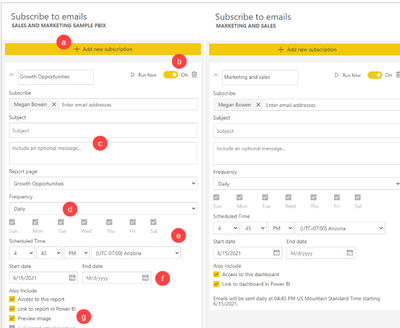
2.subscription against the power pivot report

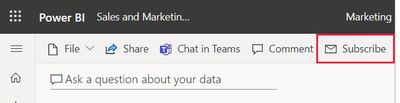
  I recommend you could publish to service and set Subscriptions.

vyalanwumsft_0-1632193350020.pngvyalanwumsft_1-1632193359814.png


Best Regards,
Community Support Team_ Yalan Wu
If this post helps, then please consider Accept it as the solution to help the other members find it more quickly.

Helpful resources

Announcements
Power BI DataViz World Championships

Power BI Dataviz World Championships

The Power BI Data Visualization World Championships is back! Get ahead of the game and start preparing now!

December 2025 Power BI Update Carousel

Power BI Monthly Update - December 2025

Check out the December 2025 Power BI Holiday Recap!

FabCon Atlanta 2026 carousel

FabCon Atlanta 2026

Join us at FabCon Atlanta, March 16-20, for the ultimate Fabric, Power BI, AI and SQL community-led event. Save $200 with code FABCOMM.