cancel
Showing results for 
Search instead for 
Did you mean: 

Learn from the best! Meet the four finalists headed to the FINALS of the Power BI Dataviz World Championships! Register now

Reply
Anonymous
Not applicable

Fill up missing values

Hi all,


I have created a new table, which gives me the maximum value of a partnr_creditor per year - month.


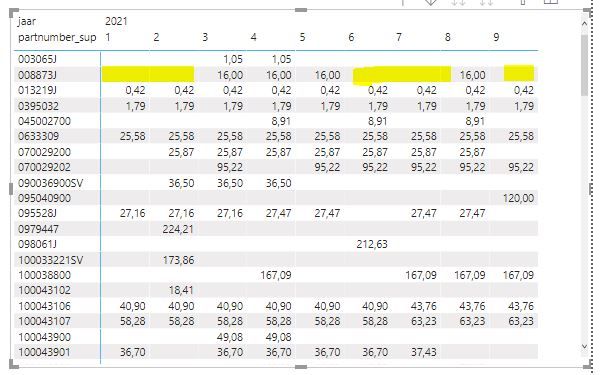
Looking at the partnumber_sup 008873J (example), I want to fill up the values for the months, which do have no values:

first look for the most recent value;

if not, look for the first-nex value


The outcome should be as follows:

Month 1 and 2: show value of month 3 (show first next value)

Month 6, 7 and 8: show value of month 5 (smost recent value)

Month 9: show value of month 8 (show most recent value)


Hope you can help me with this, thanks in advance.


John


test_tabel = 
        SUMMARIZE (
            '* werkblad',
            '* werkblad'[partnr_creditor] ,
            '* werkblad'[invoice_date] ,
            '* werkblad'[invoice_date_jaar] ,
            '* werkblad'[invoice_date_maand] ,
            "part.price.list", LASTNONBLANKVALUE ( '* werkblad'[partnr_creditor], MAX ( '* werkblad'[part.price_list] ) 
)) 

 Knipsel.JPG

1 ACCEPTED SOLUTION
MFelix
Super User
Super User

Hi @Anonymous ,


Can you please share a mockup data or sample of your PBIX file. You can use a onedrive, google drive, we transfer or similar link to upload your files.

If the information is sensitive please share it trough private message.


Regards

Miguel Félix


Did I answer your question? Mark my post as a solution!

Proud to be a Super User!

Check out my blog: Power BI em Português


View solution in original post

2 REPLIES 2
MFelix
Super User
Super User

Hi @Anonymous ,


Can you please share a mockup data or sample of your PBIX file. You can use a onedrive, google drive, we transfer or similar link to upload your files.

If the information is sensitive please share it trough private message.


Regards

Miguel Félix


Did I answer your question? Mark my post as a solution!

Proud to be a Super User!

Check out my blog: Power BI em Português


Anonymous
Not applicable

Good day @MFelix ,

Thanks fo your nmessage. I was already able to solve this isssue bij myself over the last weekend.

So, problem solved!

John

Helpful resources

Announcements
Power BI DataViz World Championships carousel

Power BI DataViz World Championships - June 2026

A new Power BI DataViz World Championship is coming this June! Don't miss out on submitting your entry.

Join our Fabric User Panel

Join our Fabric User Panel

Share feedback directly with Fabric product managers, participate in targeted research studies and influence the Fabric roadmap.

March Power BI Update Carousel

Power BI Community Update - March 2026

Check out the March 2026 Power BI update to learn about new features.