Join us at FabCon Atlanta from March 16 - 20, 2026, for the ultimate Fabric, Power BI, AI and SQL community-led event. Save $200 with code FABCOMM.
Register now!Learn from the best! Meet the four finalists headed to the FINALS of the Power BI Dataviz World Championships! Register now
Hi All,
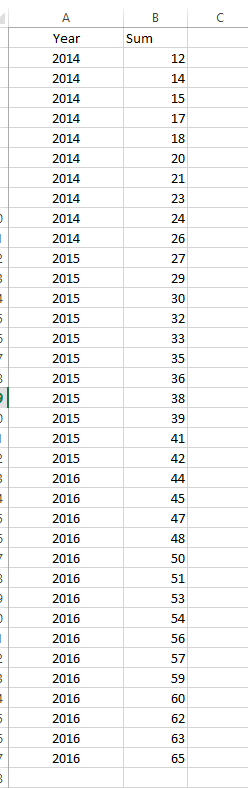
I was wondering if someone can help me. I am still new to Power BI. Basically i wold like to create measure that will only show the value of the specific year. See the picture. I would like to have the sum of all sales in each year 2014, 2015, 2016 as separated result. Can you help?
Solved! Go to Solution.
The best way to create this is to create a Date table.
Once you have created your date table you can create a relationship between your tables. After which you can use the columns in your Date table to group the data as needed.
Here is my blog post on how to create the Date Table: https://www.fourmoo.com/2016/09/13/power-bi-how-to-easily-create-dynamic-date-tabledimension-with-fi...
The best way to create this is to create a Date table.
Once you have created your date table you can create a relationship between your tables. After which you can use the columns in your Date table to group the data as needed.
Here is my blog post on how to create the Date Table: https://www.fourmoo.com/2016/09/13/power-bi-how-to-easily-create-dynamic-date-tabledimension-with-fi...
Thanks for you help. I couldn't manage that in the way you explained but i found a different approach. I will try your way also but i had to finish this quickly.
Share feedback directly with Fabric product managers, participate in targeted research studies and influence the Fabric roadmap.
Check out the February 2026 Power BI update to learn about new features.
| User | Count |
|---|---|
| 65 | |
| 58 | |
| 45 | |
| 19 | |
| 15 |