cancel
Showing results for 
Search instead for 
Did you mean: 

Get Fabric Certified for FREE during Fabric Data Days. Don't miss your chance! Request now

Reply
apoorvsi
Helper I
Helper I

Power BI format X-axis text color for different elements

Hi all,


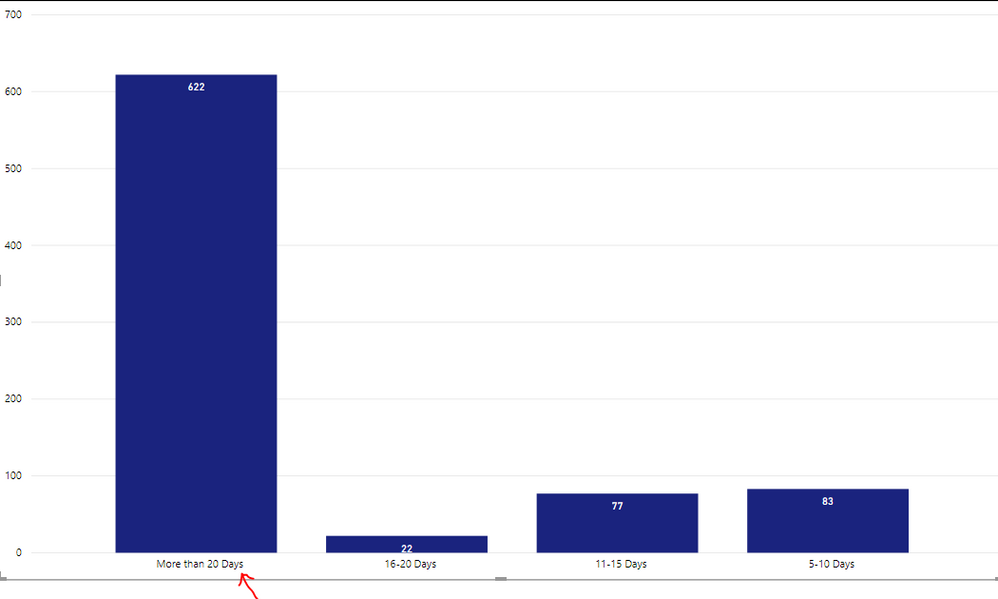
I have a requirement where in I have to color the X-axis element "More than 20 days" with red color. Please note, I do not have to color the bar red. Instead, just the text in the axis. Rest all other elements should stay black. Is it possible?


comm-pbi.PNG

5 REPLIES 5
amitchandak
Super User
Super User

@apoorvsi , Try like this will work when you are not using legend . Create a measure like

color measure = if(FIRSTNONBLANK(Table[Calegory],"NA")= "More than 20 Days","red","green")

color measure = if(max(Table[Calegory])= "More than 20 Days","red","green")


Table[Calegory] is your x-axis


Then in conditional formatting choose the field and this measure.


Color Field - Color Measure - Conditional formatting
https://radacad.com/dax-and-conditional-formatting-better-together-find-the-biggest-and-smallest-num...
https://docs.microsoft.com/en-us/power-bi/desktop-conditional-table-formatting#color-by-color-values

Share with Power BI Enthusiasts: Full Power BI Video (20 Hours) YouTube
Microsoft Fabric Series 60+ Videos YouTube
Microsoft Fabric Hindi End to End YouTube

Thanks for you answer, @amitchandak 


I am however unable to add conditional formatting on my column chart. I do not get the option at all for it.

The link you included explains it for a table.


Am I missing something here?

DataZoe
Microsoft Employee
Microsoft Employee

@apoorvsi I don't think this is possible directly, as in specify that one to be red.  But you can create a text box and format it how you like with a white background and overlay it over that bar label. 

Respectfully,
Zoe Douglas (DataZoe)


Follow me on LinkedIn at https://www.linkedin.com/in/zoedouglas-data
See my reports and blog at https://www.datazoepowerbi.com/

Thanks @DataZoe 

I have a limitation when using a text box. The categories are not fixed and are showen/hidden based on the count.

So positioning of text box cannot be static.

Is there any way I could make it dynamic?

Hi , @apoorvsi 

Dynamic text box or  X-axis  text colors for different elements is not supproted  yet currently  in Power BI.

For your requirement , you can come up with a new idea and add your comments there to make this feature coming sooner. https://ideas.powerbi.com/forums/265200-power-bi-ideas 


Best Regards,
Community Support Team _ Eason


Helpful resources

Announcements
November Power BI Update Carousel

Power BI Monthly Update - November 2025

Check out the November 2025 Power BI update to learn about new features.

Fabric Data Days Carousel

Fabric Data Days

Advance your Data & AI career with 50 days of live learning, contests, hands-on challenges, study groups & certifications and more!

FabCon Atlanta 2026 carousel

FabCon Atlanta 2026

Join us at FabCon Atlanta, March 16-20, for the ultimate Fabric, Power BI, AI and SQL community-led event. Save $200 with code FABCOMM.

Top Solution Authors
Top Kudoed Authors