cancel
Showing results for 
Search instead for 
Did you mean: 

We've captured the moments from FabCon & SQLCon that everyone is talking about, and we are bringing them to the community, live and on-demand. Starts on April 14th. Register now

Reply
Anonymous
Not applicable

Power BI Row Level Security Help

I need some help with some Row Level Security DAX formulas in Power BI.


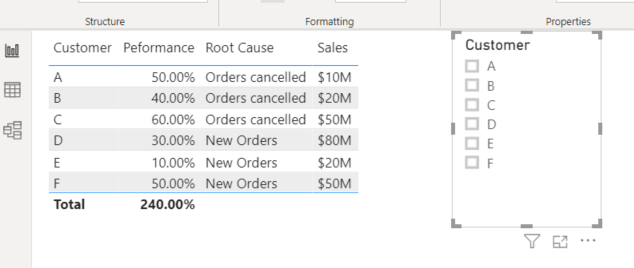
I have a list of Customers below and a filter selection.  Some users can see all the data, and some users can only see part of the data. 


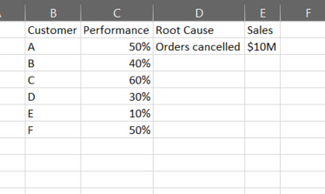
Let's say I'm Customer A.  Customer A can see everything on the Customer and Performance column, but the Root Cause and Sales fields need to be blank.


3.PNG


Example of secuirty for selecting Customer A. Notice the blank rows.


4.PNG


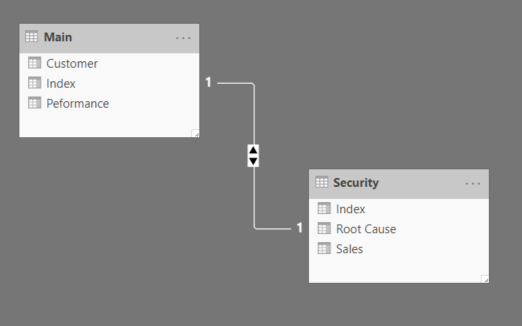
To do this I tried relating two tables then writing some DAX filtering expressions using Manage Roles.  However it seams the Manage Roles feature only let's you filter out data and I end up loosing all of the other values.


5.PNG


1 ACCEPTED SOLUTION
Anonymous
Not applicable

What I ended up doing was using a SWITCH function.  I created a new column for each role, then a Measure to Switch between the columns depending on the role.


Measure = SWITCH(SELECTEDVALUE('Table'[Switch]),"A",MAX(Security[Root_Cause_A]),"B",MAX(Security[Root_Cause_B]),MAX(Security[Root Cause]))
 
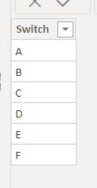
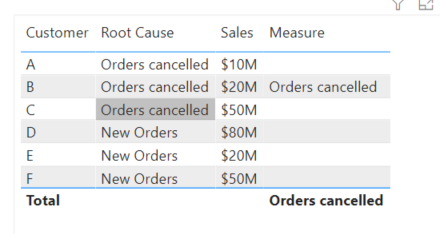
Here is what the Switch table looks like.  I then assign role level secuirty to select a single row in the Switch table.
 
1.PNG
 
Here is what the table looks like viewing as Customer B.  Notice how the Measure field is blank for all Customers except Customer B.
 
2.PNG


View solution in original post

3 REPLIES 3
Anonymous
Not applicable

Hi @Anonymous ,


As you know, it's "Row" level security.


You want to show blank in column value for different customers.


I think you can try to make it in DAX, something like:


measure = if(username() = "A", if(customer_name = username(),customer_name,blank()))


Aiolos Zhao

Anonymous
Not applicable

What I ended up doing was using a SWITCH function.  I created a new column for each role, then a Measure to Switch between the columns depending on the role.


Measure = SWITCH(SELECTEDVALUE('Table'[Switch]),"A",MAX(Security[Root_Cause_A]),"B",MAX(Security[Root_Cause_B]),MAX(Security[Root Cause]))
 
Here is what the Switch table looks like.  I then assign role level secuirty to select a single row in the Switch table.
 
1.PNG
 
Here is what the table looks like viewing as Customer B.  Notice how the Measure field is blank for all Customers except Customer B.
 
2.PNG
 
 
amitchandak
Super User
Super User

@Anonymous , see if these can help

https://community.powerbi.com/t5/MBAS-Gallery/Microsoft-Power-BI-Unleash-row-level-security-patterns-in-Power/td-p/712613
https://radacad.com/dynamic-row-level-security-with-organizational-hierarchy-power-bi

Share with Power BI Enthusiasts: Full Power BI Video (20 Hours) YouTube
Microsoft Fabric Series 60+ Videos YouTube
Microsoft Fabric Hindi End to End YouTube

Helpful resources

Announcements
New to Fabric survey Carousel

New to Fabric Survey

If you have recently started exploring Fabric, we'd love to hear how it's going. Your feedback can help with product improvements.

Power BI DataViz World Championships carousel

Power BI DataViz World Championships - June 2026

A new Power BI DataViz World Championship is coming this June! Don't miss out on submitting your entry.

Join our Fabric User Panel

Join our Fabric User Panel

Share feedback directly with Fabric product managers, participate in targeted research studies and influence the Fabric roadmap.

March Power BI Update Carousel

Power BI Community Update - March 2026

Check out the March 2026 Power BI update to learn about new features.