Join us at FabCon Atlanta from March 16 - 20, 2026, for the ultimate Fabric, Power BI, AI and SQL community-led event. Save $200 with code FABCOMM.
Register now!The Power BI Data Visualization World Championships is back! Get ahead of the game and start preparing now! Learn more
Hi, i have a dataset that is about 18mb in size, it refreshes fine, but when i download to desktop regardless of RAM size (we have tried a computer with 12, 24 and 62gb of ram) and on each machines the file crashes and when looking at task manager the it is using 95%+ of RAM and same as CPU. The file has been rebuilt twice yet the problem persists, anyone got any advice as to what the cause might be
Hi @Anonymous ,
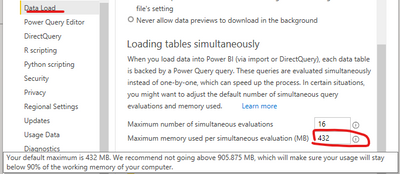
Please set this value (as screenshot highlighted ) less than 90% of the RAM on the machine.
For more detail, please refre this article.
Evaluation configuration settings for Desktop - Power BI | Microsoft Docs
Best Regards
Community Support Team _ chenwu zhu
If this post helps, then please consider Accept it as the solution to help the other members find it more quickly.
@Anonymous , 18 MB file should do use that much of RAM
OPen a empty file -> Go to-> file -> options and settings -> options -> data load
check memory management cache, keep it between 4-8 GB. Clear the current cache. save these settings and exit. Now try to open the file
The Power BI Data Visualization World Championships is back! Get ahead of the game and start preparing now!
| User | Count |
|---|---|
| 39 | |
| 37 | |
| 33 | |
| 32 | |
| 29 |
| User | Count |
|---|---|
| 132 | |
| 88 | |
| 82 | |
| 68 | |
| 64 |