cancel
Showing results for 
Search instead for 
Did you mean: 

The Power BI Data Visualization World Championships is back! Get ahead of the game and start preparing now! Learn more

Reply
Anonymous
Not applicable

Power BI: Can't run python scripts

Hi there,


I'm using Power BI Desktop and trying to make a sentimental analysis with the following python code:


import pandas as pd
from nltk.sentiment.vader import SentimentIntensityAnalyzer
import re
from googletrans import Translator


translatedList = []
for index, row in dataset.iterrows():
    translator = Translator()
    newrow = copy.deepcopy(row)
    try:
        translated = translator.translate(row['zin'], dest='en')
        newrow['translated'] = translated.text
    except Exception as e:
        print(e)
        continue

    translatedList.append(newrow)

dataset_new = pd.DataFrame(translatedList)

SentimentAnalysis = SentimentIntensityAnalyzer()

dataset['sentiment score'] = dataset['translated'].apply(lambda x: SentimentAnalysis.polarity_scores(x)['compound']


 When I run this in PowerQuery->Python Script, I get this error:

DataSource.Error: ADO.NET: Python script error.
<pi> File "C:\Users\Michael\PythonScriptWrapper_8beb0de1-0ae6-441e-9b5e-920645c3bddd\PythonScriptWrapper.PY", line 44
os.chdir(u'C:/Users/Michael/PythonScriptWrapper_8beb0de1-0ae6-441e-9b5e-920645c3bddd')
^
SyntaxError: invalid syntax
</pi>
Details:
DataSourceKind=Python
DataSourcePath=Python
Message=Python script error.
<pi> File "C:\Users\Michael\PythonScriptWrapper_8beb0de1-0ae6-441e-9b5e-920645c3bddd\PythonScriptWrapper.PY", line 44
os.chdir(u'C:/Users/Michael/PythonScriptWrapper_8beb0de1-0ae6-441e-9b5e-920645c3bddd')
^
SyntaxError: invalid syntax
</pi>
ErrorCode=-2147467259
ExceptionType=Microsoft.PowerBI.Scripting.Python.Exceptions.PythonScriptRuntimeException

Can someone help me figuring out what the problem is?


1 ACCEPTED SOLUTION
v-luwang-msft
Community Support
Community Support

HI @Anonymous ,

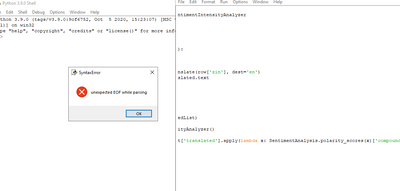
When I test your python script  by python  3.9.Then :

v-luwang-msft_0-1620265515845.png

There seems to be a problem with the script itself.

SyntaxError: unexpected EOF while parsing


Wish it is helpful for you!


Best Regards

Lucien

View solution in original post

3 REPLIES 3
Xiaoqing
New Member

Maybe I can help you, I'm familiar with python programming in Power BI.

You can contact me at: xiaoqing.gao@cn.abb.com

v-luwang-msft
Community Support
Community Support

HI @Anonymous ,

When I test your python script  by python  3.9.Then :

v-luwang-msft_0-1620265515845.png

There seems to be a problem with the script itself.

SyntaxError: unexpected EOF while parsing


Wish it is helpful for you!


Best Regards

Lucien

Anonymous
Not applicable

 No answer?

Helpful resources

Announcements
Power BI DataViz World Championships

Power BI Dataviz World Championships

The Power BI Data Visualization World Championships is back! Get ahead of the game and start preparing now!

November Power BI Update Carousel

Power BI Monthly Update - November 2025

Check out the November 2025 Power BI update to learn about new features.

FabCon Atlanta 2026 carousel

FabCon Atlanta 2026

Join us at FabCon Atlanta, March 16-20, for the ultimate Fabric, Power BI, AI and SQL community-led event. Save $200 with code FABCOMM.