cancel
Showing results for 
Search instead for 
Did you mean: 

The Power BI Data Visualization World Championships is back! Get ahead of the game and start preparing now! Learn more

Reply
Anonymous
Not applicable

Power BI: Can't run python scripts

Hi there,


I'm using Power BI Desktop and trying to make a sentimental analysis with the following python code:


import pandas as pd
from nltk.sentiment.vader import SentimentIntensityAnalyzer
import re
from googletrans import Translator


translatedList = []
for index, row in dataset.iterrows():
    translator = Translator()
    newrow = copy.deepcopy(row)
    try:
        translated = translator.translate(row['zin'], dest='en')
        newrow['translated'] = translated.text
    except Exception as e:
        print(e)
        continue

    translatedList.append(newrow)

dataset_new = pd.DataFrame(translatedList)

SentimentAnalysis = SentimentIntensityAnalyzer()

dataset['sentiment score'] = dataset['translated'].apply(lambda x: SentimentAnalysis.polarity_scores(x)['compound']


 When I run this in PowerQuery->Python Script, I get this error:

DataSource.Error: ADO.NET: Python script error.
<pi> File "C:\Users\Michael\PythonScriptWrapper_8beb0de1-0ae6-441e-9b5e-920645c3bddd\PythonScriptWrapper.PY", line 44
os.chdir(u'C:/Users/Michael/PythonScriptWrapper_8beb0de1-0ae6-441e-9b5e-920645c3bddd')
^
SyntaxError: invalid syntax
</pi>
Details:
DataSourceKind=Python
DataSourcePath=Python
Message=Python script error.
<pi> File "C:\Users\Michael\PythonScriptWrapper_8beb0de1-0ae6-441e-9b5e-920645c3bddd\PythonScriptWrapper.PY", line 44
os.chdir(u'C:/Users/Michael/PythonScriptWrapper_8beb0de1-0ae6-441e-9b5e-920645c3bddd')
^
SyntaxError: invalid syntax
</pi>
ErrorCode=-2147467259
ExceptionType=Microsoft.PowerBI.Scripting.Python.Exceptions.PythonScriptRuntimeException

Can someone help me figuring out what the problem is?


1 ACCEPTED SOLUTION
v-luwang-msft
Community Support
Community Support

HI @Anonymous ,

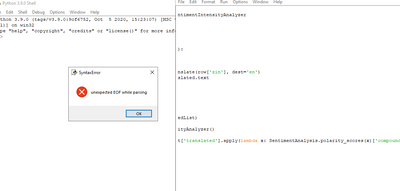
When I test your python script  by python  3.9.Then :

v-luwang-msft_0-1620265515845.png

There seems to be a problem with the script itself.

SyntaxError: unexpected EOF while parsing


Wish it is helpful for you!


Best Regards

Lucien

View solution in original post

3 REPLIES 3
Xiaoqing
New Member

Maybe I can help you, I'm familiar with python programming in Power BI.

You can contact me at: xiaoqing.gao@cn.abb.com

v-luwang-msft
Community Support
Community Support

HI @Anonymous ,

When I test your python script  by python  3.9.Then :

v-luwang-msft_0-1620265515845.png

There seems to be a problem with the script itself.

SyntaxError: unexpected EOF while parsing


Wish it is helpful for you!


Best Regards

Lucien

Anonymous
Not applicable

 No answer?

Helpful resources

Announcements
November Power BI Update Carousel

Power BI Monthly Update - November 2025

Check out the November 2025 Power BI update to learn about new features.

Fabric Data Days Carousel

Fabric Data Days

Advance your Data & AI career with 50 days of live learning, contests, hands-on challenges, study groups & certifications and more!

FabCon Atlanta 2026 carousel

FabCon Atlanta 2026

Join us at FabCon Atlanta, March 16-20, for the ultimate Fabric, Power BI, AI and SQL community-led event. Save $200 with code FABCOMM.

Top Kudoed Authors