
cancel
Showing results for 
Search instead for 
Did you mean: 

The Power BI Data Visualization World Championships is back! Get ahead of the game and start preparing now! Learn more

Reply
SokMunki
Frequent Visitor

Power Automate Visual Not Available?

Hi all! I'm using Version: 2.109.1021.0 64-bit (September 2022), and I'm trying to add the "Power Automate" visual. It doesn't seem to be available, however. Has it been renamed or retired?


I'm trying to create a button for the end user to export to Excel -- is there a different visual/approach I can use to do that?

Thanks for your help!

5 REPLIES 5
Sighrus
New Member

I have he same issue, on Version: 2.109.1021.0 64-bit (September 2022). All the YoutTube videos and websites I've read mention a min version level of Aptil 2021, but this visualisation seems to only exist in those video's and screenshots..... Even microsoft's official guide does not mention any minimum version required? 

https://learn.microsoft.com/en-us/power-bi/create-reports/power-bi-automate-visual?tabs=powerbi-desk...


I simply get a 404 page when trying to load links to the AppSource page everyone refers to here:

https://go.microsoft.com/fwlink/?linkid=2160902

which resolves to:

https://appsource.microsoft.com/en-AU/product/power-bi-visuals/WA200002803?tab=Overview&exp=kyyw


It seems crazy that this visualsation seems to have dissappeared off the face of the internet leaving no trace but some references to it.......?


EDIT: Ok, so I downloaded the newest version and it had it, so in a last ditch attempt I found the pbiviz file here and installed it and it is not compltible with Sep 2022 😞 Why can't AppSource just show that?

https://github.com/microsoft/powerbi-desktop-samples/blob/2b64cb14af7d4b6a2dc97826709614dd431968d0/M...

miTutorials
Super User
Super User

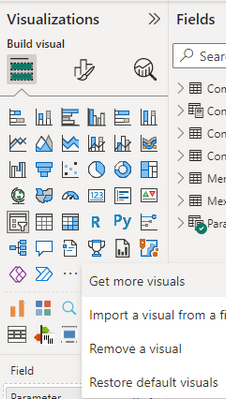
It's very much there. Click on "Restore Default visuals" you will get that back.


miTutorials_0-1678206668279.png


Regards

Ismail

www.youtube.com/MiTutorials


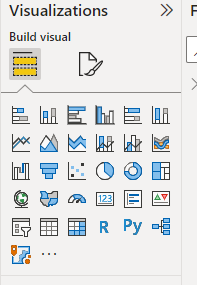
Unfortunately that didn't work: here's what I have (after "Restore Default Visuals" then restarting Power BI):

SokMunki_0-1678207590233.png


I then go to "Get More Visuals":

SokMunki_1-1678207655415.png

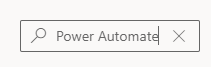
...and sadly:

SokMunki_2-1678207682443.png


I also don't see Power Apps visual there. Perhaps you can try updating your PBI Dekstop to latest version ?

Unfortunately that's not an option right now -- our business likes to stay on prior versions for stability reasons. I'd seen references to the Power Automate (Flow?) visual in Youtube tutorials dating back to late 2021, so I figured the September 2022 would've had it.

I appreicate your help here, thank you!

Helpful resources

Announcements
November Power BI Update Carousel

Power BI Monthly Update - November 2025

Check out the November 2025 Power BI update to learn about new features.

Fabric Data Days Carousel

Fabric Data Days

Advance your Data & AI career with 50 days of live learning, contests, hands-on challenges, study groups & certifications and more!

FabCon Atlanta 2026 carousel

FabCon Atlanta 2026

Join us at FabCon Atlanta, March 16-20, for the ultimate Fabric, Power BI, AI and SQL community-led event. Save $200 with code FABCOMM.

Top Kudoed Authors
Users online (749)