cancel
Showing results for 
Search instead for 
Did you mean: 

July 7 - July 17 | Round 2 of the Power BI Dataviz World Championships. Don't miss your chance! Learn more

Reply
Anonymous
Not applicable

Potential Azure Analysis Services Connector Defect

Hi,


Not certain if this is a "defect" or by design, but from PBI Desktop, when you connect to an AAS instance a pop-up appears asking for Azure credentials..


This creates a file, here: C:\Users\<username>\AppData\Local\AADCacheOM\


This file seems to contain the creds that you typed in that first time you connected to the service, and there is no way to change it without deleting the file, and PBI asking you for crednetials again.


Some points on this:

  1. It's not obvious how to change the user that you are passing to AAS after the first time, which invariably will be a test...
  2. We expected the organisational account logged in to PBI Desktop to be "passed through"...
  3. Is this behaviour currently be design as the connector is Beta?
  4. Will this be addressed for the full release?

Thanks,


Chris.

4 REPLIES 4
v-ljerr-msft
Microsoft Employee
Microsoft Employee

Hi @Anonymous,


This file seems to contain the creds that you typed in that first time you connected to the service, and there is no way to change it without deleting the file, and PBI asking you for crednetials again. 

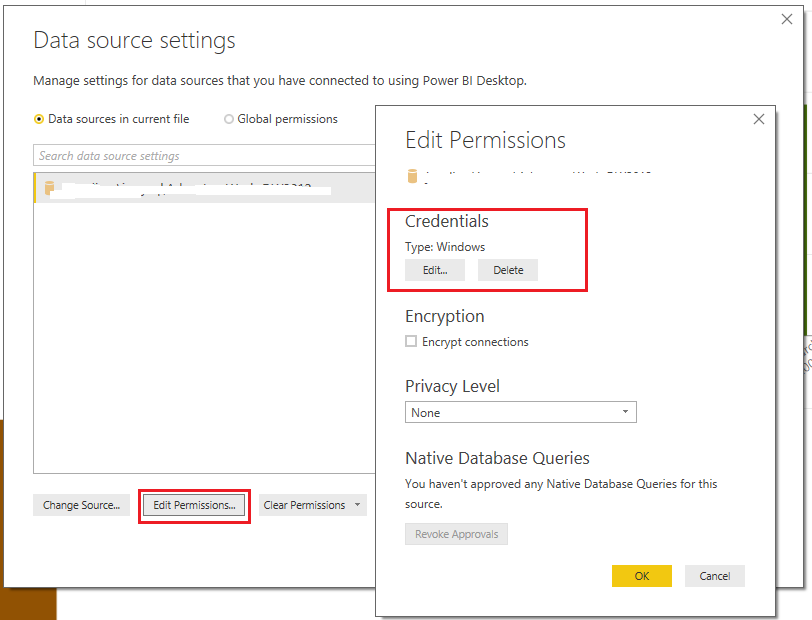
In order to change the credentials for your AAS instance on Power BI Desktop, you can go to File Menu –  Options and SettingsData Source settings, Edit Permissions, Credentials.


image


Or you can just delete the current credential, then PBI will ask you for credentials again when the same data source is used next time.


changep.PNG


Regards

Anonymous
Not applicable

Hi,


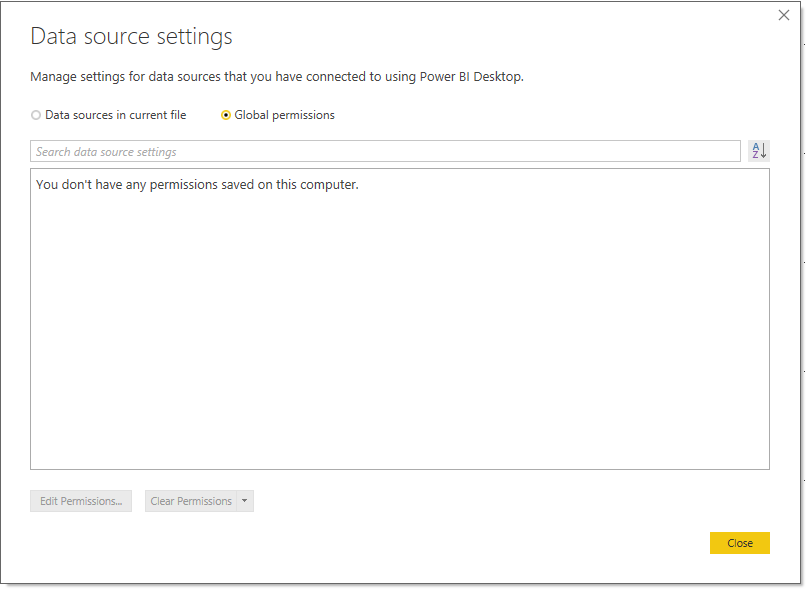
There are no entries in that location in PBI Desktop for the connection to AAS I'm afraid, the only place that it seems to appear / be persisted is in the foder i mentioned.

Capture.PNG

I can close, and re-open PBI Desktop, and there is still nothing retained in that view.


Having said that though, it sometimes takes a vewy long time for the cached file to appear in that folder, which (while it's waiting to be created) can exhibit some very odd behaviours..


Oddly, even if that file is deleted from the file system, BI Desktop restarted, connecting to the same data set STILL uses the old creds.


The only way to (sometimes) kick it in to refreshing the cred prompt is to change who you are logged in to PBI Desktop as... but this sometimes *seems* to not work...


So weird(!)


Hi @Anonymous,


I have verified that we can change the credentials only when connecting to SSAS/AAS with import mode, there is no edit credential for SSAS/AAS live connection to use alternate credential, as it is supported currently. Here is a similar thread for your reference. So I would suggest you submit your requirement on Power BI Ideas to improve Power BI on this feature.Smiley Happy


Regards

You can clear global permissions and check that will fix this asking for new cred.

Helpful resources

Announcements
FabCon and SQLCon Barcelona 2026

FabCon & SQLCon – Barcelona 2026

Join us in Barcelona for FabCon and SQLCon, the Fabric, Power BI, SQL, and AI community event. Save €200 with code FABCMTY200.

60 days of Data Days Carousel

Data Days 2026

Join Data Days 2026: 60 days of free live/on-demand sessions, challenges, study groups, and certification opportunities.

Power BI DataViz World Championships carousel

Power BI DataViz World Championships - June 2026

A new Power BI DataViz World Championship is coming this June! Don't miss out on submitting your entry.

Top Solution Authors