This time we’re going bigger than ever. Fabric, Power BI, SQL, AI and more. We're covering it all. You won't want to miss it.
Learn moreDid you hear? There's a new SQL AI Developer certification (DP-800). Start preparing now and be one of the first to get certified. Register now
Hi community,
I have a requirement where I need to pivot (kind of) a table with column having stacked values. Its like this:
------------------------------
Product name | Ingredients
------------------------------
ABC | Apple, Soda, Vinegar
DEF | Vinegar, Strawberry, Soda
LMN | Mango, Soda, Vinegar
PQR | Honey, Mango
Now I need to have a table / visual which has the individual count of each ingredient like this:
-------------------------------
Ingredient | No. of products
-------------------------------
Apple | 1
Vinegar | 3
Soda | 3
Mango | 2
Honey | 1
-------------------------
How do we approach such situations which involve splitting of individual parameters and find the count of them?
Thanks in advance
Solved! Go to Solution.
Hi @Praveen6245
Please follow the linked discussion: https://community.fabric.microsoft.com/t5/Desktop/Pie-Chart-Separating-Values-in-Same-Row/m-p/324564...
I gave there 2 solutions :
DAX and POWER query.
(power query is much more recommended)
it is also links to sample files there
If this post helps, then please consider Accepting it as the solution to help the other members find it more quickly
Hi @Praveen6245 ,
You can copy my code and paste it into advanced editor.
let
Source = Table.FromRows(Json.Document(Binary.Decompress(Binary.FromText("i45WcnRyVtJRciwoyEnVUQjOT0nUUQjLzEtNTyxSitWJVnJxdQNKQ0WACkqKEsuTUouKKiGKwWp8fP2AanwT89LzsRkREBgElPbIz0sFagKrUoqNBQA=", BinaryEncoding.Base64), Compression.Deflate)), let _t = ((type nullable text) meta [Serialized.Text = true]) in type table [#"Product name " = _t, Ingredients = _t]),
#"Changed Type" = Table.TransformColumnTypes(Source,{{"Product name ", type text}, {"Ingredients", type text}}),
#"Split Column by Delimiter" = Table.ExpandListColumn(Table.TransformColumns(#"Changed Type", {{"Ingredients", Splitter.SplitTextByDelimiter(",", QuoteStyle.Csv), let itemType = (type nullable text) meta [Serialized.Text = true] in type {itemType}}}), "Ingredients"),
#"Replaced Value" = Table.ReplaceValue(#"Split Column by Delimiter"," ","",Replacer.ReplaceText,{"Ingredients"}),
#"Changed Type1" = Table.TransformColumnTypes(#"Replaced Value",{{"Ingredients", type text}}),
#"Grouped Rows" = Table.Group(#"Changed Type1", {"Ingredients"}, {{"Count", each Table.RowCount(_), Int64.Type}})
in
#"Grouped Rows"
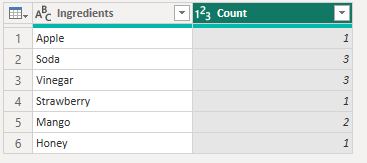
Best Regards,
Rico Zhou
If this post helps, then please consider Accept it as the solution to help the other members find it more quickly.
Hi @Praveen6245 ,
You can copy my code and paste it into advanced editor.
let
Source = Table.FromRows(Json.Document(Binary.Decompress(Binary.FromText("i45WcnRyVtJRciwoyEnVUQjOT0nUUQjLzEtNTyxSitWJVnJxdQNKQ0WACkqKEsuTUouKKiGKwWp8fP2AanwT89LzsRkREBgElPbIz0sFagKrUoqNBQA=", BinaryEncoding.Base64), Compression.Deflate)), let _t = ((type nullable text) meta [Serialized.Text = true]) in type table [#"Product name " = _t, Ingredients = _t]),
#"Changed Type" = Table.TransformColumnTypes(Source,{{"Product name ", type text}, {"Ingredients", type text}}),
#"Split Column by Delimiter" = Table.ExpandListColumn(Table.TransformColumns(#"Changed Type", {{"Ingredients", Splitter.SplitTextByDelimiter(",", QuoteStyle.Csv), let itemType = (type nullable text) meta [Serialized.Text = true] in type {itemType}}}), "Ingredients"),
#"Replaced Value" = Table.ReplaceValue(#"Split Column by Delimiter"," ","",Replacer.ReplaceText,{"Ingredients"}),
#"Changed Type1" = Table.TransformColumnTypes(#"Replaced Value",{{"Ingredients", type text}}),
#"Grouped Rows" = Table.Group(#"Changed Type1", {"Ingredients"}, {{"Count", each Table.RowCount(_), Int64.Type}})
in
#"Grouped Rows"
Best Regards,
Rico Zhou
If this post helps, then please consider Accept it as the solution to help the other members find it more quickly.
Hi,
In the Query Editor, use the Split column to split the Ingredients column into rows. To your visual, drag the Ingredients column to the visual. Write this measure
Count = countrows(Data)
Hope this helps.
Hi @Praveen6245
Please follow the linked discussion: https://community.fabric.microsoft.com/t5/Desktop/Pie-Chart-Separating-Values-in-Same-Row/m-p/324564...
I gave there 2 solutions :
DAX and POWER query.
(power query is much more recommended)
it is also links to sample files there
If this post helps, then please consider Accepting it as the solution to help the other members find it more quickly
Check out the April 2026 Power BI update to learn about new features.
If you have recently started exploring Fabric, we'd love to hear how it's going. Your feedback can help with product improvements.
| User | Count |
|---|---|
| 37 | |
| 37 | |
| 31 | |
| 21 | |
| 16 |
| User | Count |
|---|---|
| 66 | |
| 56 | |
| 31 | |
| 26 | |
| 23 |