cancel
Showing results for 
Search instead for 
Did you mean: 

We've captured the moments from FabCon & SQLCon that everyone is talking about, and we are bringing them to the community, live and on-demand. Starts on April 14th. Register now

Reply
Anonymous
Not applicable

Position in Array

Hi,


i have an array with data from Micrsoft Forms like:


["other","option 1", "option2","otpion3"]


The OTHER is a free text, you can witre anything, i already create a column for each Option1/2/3 and count every time that question come in array.


My problem is determinte when the user choose the Other option.


My idea is determiate what cames in first place in array and if is diferent from Option 1/2/3 Create new column and write 1.


Can help with that? 

1 ACCEPTED SOLUTION

Hi @Anonymous 


Please check if below formula could help you.

Answer 1 = 
VAR FirstText =
    PATHITEM ( SUBSTITUTE ( Question[Q1], ",", "|" ), 1 )
RETURN
    IF ( SEARCH ( "Answer 1", FirstText, 1, 0 ), 1, 0 )

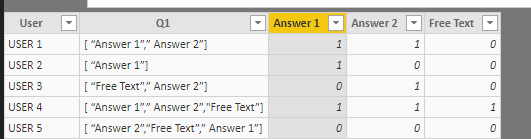
1.png


Regards,

Cherie

Community Support Team _ Cherie Chen
If this post helps, then please consider Accept it as the solution to help the other members find it more quickly.

View solution in original post

4 REPLIES 4
v-cherch-msft
Microsoft Employee
Microsoft Employee

Hi @Anonymous 


I cannot fully understand it.Could you explain more about your expected output?You can upload the .pbix file to OneDrive and post the link here or send me via private message. Do mask sensitive data before uploading.Please follow this article How to Get Your Question Answered Quickly to post your question.


Regards,

Cherie

Community Support Team _ Cherie Chen
If this post helps, then please consider Accept it as the solution to help the other members find it more quickly.
Anonymous
Not applicable

Hi @v-cherch-msft ,


Let me know if understand this exemple.


Windows Forms Survey (Same question, differents answers)

Q1. Exmple1:

  • Answer 1 (selected by user)
  • Answer 2 (selected by user)
  • Answer 3
  • Other: ____Free Text__________ (selected by user)

Layout of array write in SQL Table

[“Free text”, “Answer 1”,” Answer 2”]


Q1. Exmple2:

  • Answer 1 (selected by user)
  • Answer 2 (selected by user)
  • Answer 3
  • Other: ____________

Layout of array write in SQL Table;

[ “Answer 1”,” Answer 2”]


The problem is when the user chooses de other option, but the string always came  in 1st position of array.


Column 1 = IF(SEARCH("Answer 1";(Survey_View[Exmple1]);1;0);1;0)

Column 2 = IF(SEARCH("Answer 2";( Survey_View[Exmple2]);1;0);1;0)

Column 3 = ???


RETURN PowerBI

User

Q1

Column 1

Column 2

Column 3

USER 1

[ “Answer 1”,” Answer 2”]

1

1

0

USER 2

[ “Answer 1”]

1

0

0

USER 3

[ “Free Text”,” Answer 2”]

0

1

1

Hi @Anonymous 


Please check if below formula could help you.

Answer 1 = 
VAR FirstText =
    PATHITEM ( SUBSTITUTE ( Question[Q1], ",", "|" ), 1 )
RETURN
    IF ( SEARCH ( "Answer 1", FirstText, 1, 0 ), 1, 0 )

1.png


Regards,

Cherie

Community Support Team _ Cherie Chen
If this post helps, then please consider Accept it as the solution to help the other members find it more quickly.
Anonymous
Not applicable

In part helps,


Todo what i want i created a column with first position of array then a create another column to calculate if exist what i want...

Helpful resources

Announcements
New to Fabric survey Carousel

New to Fabric Survey

If you have recently started exploring Fabric, we'd love to hear how it's going. Your feedback can help with product improvements.

Power BI DataViz World Championships carousel

Power BI DataViz World Championships - June 2026

A new Power BI DataViz World Championship is coming this June! Don't miss out on submitting your entry.

Join our Fabric User Panel

Join our Fabric User Panel

Share feedback directly with Fabric product managers, participate in targeted research studies and influence the Fabric roadmap.

March Power BI Update Carousel

Power BI Community Update - March 2026

Check out the March 2026 Power BI update to learn about new features.