This time we’re going bigger than ever. Fabric, Power BI, SQL, AI and more. We're covering it all. You won't want to miss it.
Learn moreDid you hear? There's a new SQL AI Developer certification (DP-800). Start preparing now and be one of the first to get certified. Register now
I have two tables:
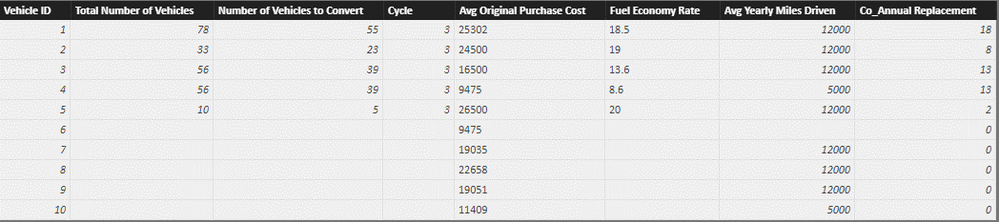
FactsVehicle:
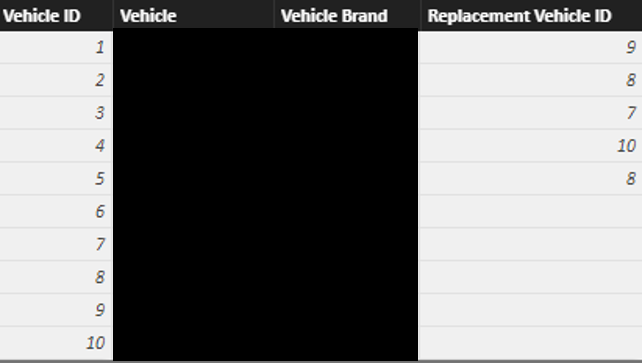
and dimVehicle (below), which is joined to FactsVehicle by Vehicle ID. The dimVehicle table also has a column called Replacement Vehicle ID, which means Vehicle 1 will be replaced by Vehicle 9 over time:
What I want to do is populate the missing values in FactsVehicle columns Total Number of Vehicles and Number of Vehicles to be the values for the replacement vehicle ID. For example, Vehicle ID 9 in FactsVehicles should have Vehicle ID 1's values for Total number of vehicles (78) and number of vehicles to convert (55).
How would I accomplish this?
Hi @Anonymous,
I used a multi-step approach:
1. First, I created a new column in dimVehicle table for Total Number of Vehicles:
Total Number of Vehicles = LOOKUPVALUE(FactsVehicle[Total Number of Vehicles], dimVehicle[Vehicle ID], dimVehicle[Vehicle ID])
2. Next, I created a new column Replacement Vehicle ID in FactsVehicle:
Replacement Vehicle ID = LOOKUPVALUE(dimVehicle[Replacement Vehicle ID], dimVehicle[Vehicle ID], FactsVehicle[Vehicle ID])
3. Lastly created a new column for Total Number of Vehicles 2 (You can use this column in the table instead of Total Number of Vehicles)
Total Number of Vehicles 2 = if(ISBLANK(FactsVehicle[Total Number of Vehicles]), LOOKUPVALUE(dimVehicle[Total Number of Vehicles], dimVehicle[Replacement Vehicle ID], FactsVehicle[Vehicle ID]), FactsVehicle[Total Number of Vehicles])
This column uses the Total Number of Vehicles value for replacement ID where there is a NULL value in the original table.
There probably exists a better solution but this should give you the desired outcome.
Hope this helps.

Check out the April 2026 Power BI update to learn about new features.
Sign up to receive a private message when registration opens and key events begin.
If you have recently started exploring Fabric, we'd love to hear how it's going. Your feedback can help with product improvements.
| User | Count |
|---|---|
| 35 | |
| 32 | |
| 27 | |
| 23 | |
| 16 |
| User | Count |
|---|---|
| 65 | |
| 50 | |
| 30 | |
| 25 | |
| 24 |