cancel
Showing results for 
Search instead for 
Did you mean: 

The Power BI Data Visualization World Championships is back! Get ahead of the game and start preparing now! Learn more

Reply
FireFireFire
Frequent Visitor

Please help me with my Stacked Column Chart

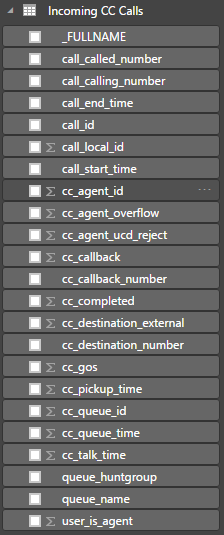
I have a table "Incoming CC Calls".


table.PNG


I want to see how many calls were accepted / missed per queue.


I want to do this with a stacked column chart.

On the X axis should be listed the 'queue_name's.

On the Y axis should be listed the count of accepted calls and missed calls, which add up to the total count of received calls.


A missed call is every call where cc_talk_time is < 1.

An accepted call is every call where cc_talk_time is > 0

Total received calls is every call (row) in the table.


I have no idea what to do. Everything I try fails. How do I start?

1 ACCEPTED SOLUTION
spuder
Resolver IV
Resolver IV

Hi @FireFireFire


I would start with a calculated column that extracts the info wether it is a missed or accepted call.


missed/accepted = IF([cc_talk_time]<0.1,"missed","accepted"


generate your stacked column chart and use this column in legend. 


use queues on the axis field 


and cc_call_time on values (set cc_call_time to count)


This is what I understand was your problem and the solution. 

View solution in original post

2 REPLIES 2
spuder
Resolver IV
Resolver IV

Hi @FireFireFire


I would start with a calculated column that extracts the info wether it is a missed or accepted call.


missed/accepted = IF([cc_talk_time]<0.1,"missed","accepted"


generate your stacked column chart and use this column in legend. 


use queues on the axis field 


and cc_call_time on values (set cc_call_time to count)


This is what I understand was your problem and the solution. 

Great, thank you. Now I get it. The different values per column are the count of each distinct legend item.

Thanks!

Helpful resources

Announcements
November Power BI Update Carousel

Power BI Monthly Update - November 2025

Check out the November 2025 Power BI update to learn about new features.

Fabric Data Days Carousel

Fabric Data Days

Advance your Data & AI career with 50 days of live learning, contests, hands-on challenges, study groups & certifications and more!

FabCon Atlanta 2026 carousel

FabCon Atlanta 2026

Join us at FabCon Atlanta, March 16-20, for the ultimate Fabric, Power BI, AI and SQL community-led event. Save $200 with code FABCOMM.

Top Kudoed Authors