cancel
Showing results for 
Search instead for 
Did you mean: 

Next up in the FabCon + SQLCon recap series: The roadmap for Microsoft SQL and Maximizing Developer experiences in Fabric. All sessions are available on-demand after the live show. Register now

Reply
Jeremiah209
Regular Visitor

Please Help! :)

Hi All,


I am new to the community, but love all the feedback on here, soooo helpful!


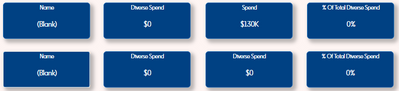
I had one question - I am trying to set up a "Card" in Powerbi where the total spend for a person shows up only, but the cavaeat, I need to do this for multiple people (17) without having to filter. How would I do this? I was able to get the persons name alone on a card without having to filter - I used count of the total in one measure and then used "IF" statement for another measure, then Name of person which worked. When trying this for spend, no luck. I attached a picture for an example. Any information is greatly appreciated! 


Jeremiah209_2-1659332863238.png


2 ACCEPTED SOLUTIONS
bcdobbs
Community Champion
Community Champion

So if you want to do it explicitly in a measure you'd do something like:


Person A Total = 

CALCULATE (

 [Total Spend],

  Table[PersonName] = "Person A"

)


However it would be far easier to just use the total spend measure in each card and set a visual level filter (pane on right hand side) direct to it. You can lock it and hide it so end user can't change it.


Ben Dobbs

LinkedIn | Twitter | Blog

Did I answer your question? Mark my post as a solution! This will help others on the forum!
Appreciate your Kudos!!

View solution in original post

Jeremiah209
Regular Visitor

Thank you sooo much for the speedy response, this was very helpful! 🙂 


If I run into any issues I will reach back out.


Have a great week! 

View solution in original post

2 REPLIES 2
Jeremiah209
Regular Visitor

Thank you sooo much for the speedy response, this was very helpful! 🙂 


If I run into any issues I will reach back out.


Have a great week! 

bcdobbs
Community Champion
Community Champion

So if you want to do it explicitly in a measure you'd do something like:


Person A Total = 

CALCULATE (

 [Total Spend],

  Table[PersonName] = "Person A"

)


However it would be far easier to just use the total spend measure in each card and set a visual level filter (pane on right hand side) direct to it. You can lock it and hide it so end user can't change it.


Ben Dobbs

LinkedIn | Twitter | Blog

Did I answer your question? Mark my post as a solution! This will help others on the forum!
Appreciate your Kudos!!

Helpful resources

Announcements
New to Fabric survey Carousel

New to Fabric Survey

If you have recently started exploring Fabric, we'd love to hear how it's going. Your feedback can help with product improvements.

Power BI DataViz World Championships carousel

Power BI DataViz World Championships - June 2026

A new Power BI DataViz World Championship is coming this June! Don't miss out on submitting your entry.

Join our Fabric User Panel

Join our Fabric User Panel

Share feedback directly with Fabric product managers, participate in targeted research studies and influence the Fabric roadmap.

March Power BI Update Carousel

Power BI Community Update - March 2026

Check out the March 2026 Power BI update to learn about new features.