Join us at FabCon Atlanta from March 16 - 20, 2026, for the ultimate Fabric, Power BI, AI and SQL community-led event. Save $200 with code FABCOMM.
Register now!The Power BI Data Visualization World Championships is back! Get ahead of the game and start preparing now! Learn more
Hi,
I want to have
<iframe width="100%" height="640" style="width: 100%; height: 640px; border: none;" frameborder="0" allow="vr,gyroscope,accelerometer,fullscreen" scrolling="no" allowfullscreen="true" style="max-width: 100%;" src="https://kuula.co/share/7lrH8?fs=1&vr=0&thumbs=1&chromeless=0&logo=0"></iframe>
in my Power BI report. Is there any way to do it?
Thanks for any advice provided,
Tom
Solved! Go to Solution.
Hi tomislav1975,
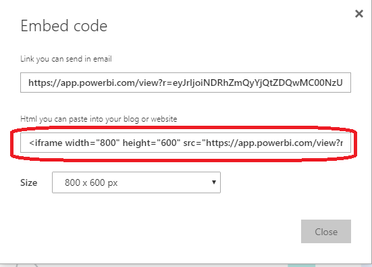
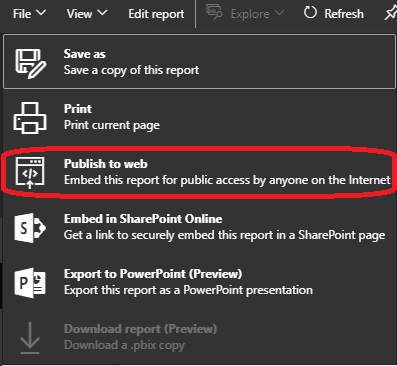
I'm afraid you can't embed your iframe into power bi report itself. As a workaround, you can click file->publish to web, then embed the power bi report iframe and your iframe into a html page together.
You can also use power bi rest api to achieve power bi report in your custom app. Here is link for your reference:
https://msdn.microsoft.com/en-us/library/dn877544.aspx.
Regards,
Jimmy Tao
Hi tomislav1975,
I'm afraid you can't embed your iframe into power bi report itself. As a workaround, you can click file->publish to web, then embed the power bi report iframe and your iframe into a html page together.
You can also use power bi rest api to achieve power bi report in your custom app. Here is link for your reference:
https://msdn.microsoft.com/en-us/library/dn877544.aspx.
Regards,
Jimmy Tao
The Power BI Data Visualization World Championships is back! Get ahead of the game and start preparing now!
| User | Count |
|---|---|
| 41 | |
| 38 | |
| 36 | |
| 31 | |
| 28 |
| User | Count |
|---|---|
| 129 | |
| 88 | |
| 79 | |
| 68 | |
| 63 |