Join us at FabCon Atlanta from March 16 - 20, 2026, for the ultimate Fabric, Power BI, AI and SQL community-led event. Save $200 with code FABCOMM.
Register now!Learn from the best! Meet the four finalists headed to the FINALS of the Power BI Dataviz World Championships! Register now
Hi All
I want to pivot the table.
There is a lot of tutorials to unpivot the table in the power query.
However, I want to get the pivot separated by comma like this from the unpivot table.
| Name | Items |
| Adrian | Book, Shoes, Chair |
| Beth | Paper, Bottle |
| Charles | Pen, pencil |
| Dew | Shoes, Sock |
Is there any way to do this in M language? I don't want to do it in DAX.
Solved! Go to Solution.
You may refer to the post below.
I'm assuming you're after something like this:
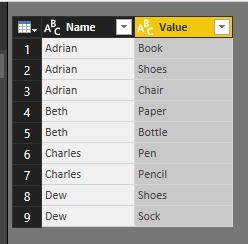
Split on each occurance of comma, and then unpivot the broken out items (select all but the Name and unpivot). I took the liberty of trimming and making the casing consistent:
let
Source = Table.FromRows(Json.Document(Binary.Decompress(Binary.FromText("LcxBCsAgDETRq4Ssc4naHqDgUlyIDSiKkSj0+rWl23nDdw63S3NoSGhECoFNwoNgTyErenJoeKalZ+isBEbmrPzBumjl8Ro3gs4t5vrJwfda/5KVWND7Bw==", BinaryEncoding.Base64), Compression.Deflate)), let _t = ((type text) meta [Serialized.Text = true]) in type table [Name = _t, Items = _t]),
#"Changed Type" = Table.TransformColumnTypes(Source,{{"Name", type text}, {"Items", type text}}),
#"Split Column by Delimiter" = Table.SplitColumn(#"Changed Type", "Items", Splitter.SplitTextByDelimiter(",", QuoteStyle.Csv), {"Items.1", "Items.2", "Items.3"}),
#"Changed Type1" = Table.TransformColumnTypes(#"Split Column by Delimiter",{{"Items.1", type text}, {"Items.2", type text}, {"Items.3", type text}}),
#"Unpivoted Columns" = Table.UnpivotOtherColumns(#"Changed Type1", {"Name"}, "Attribute", "Value"),
#"Removed Columns" = Table.RemoveColumns(#"Unpivoted Columns",{"Attribute"}),
#"Trimmed Text" = Table.TransformColumns(#"Removed Columns",{{"Value", Text.Trim, type text}}),
#"Capitalized Each Word" = Table.TransformColumns(#"Trimmed Text",{{"Value", Text.Proper, type text}})
in
#"Capitalized Each Word"
Hi Both,
What I want to achieve is the pivot table, not unpivot table.
So instead of each row consists only 1 item, i want to consolidate them into column with comma separated values.
Hi,
I am confused. Show your actual data and also your expected result.
Hi,
In the Query Editor window (Edit Query), right click on the heading of the second column and under Split columns > Delimiter > Comma, go to Advanced and select rows there. Click on OK. Now each item will appear in its own cell. You can create a Pivot Table.
Share feedback directly with Fabric product managers, participate in targeted research studies and influence the Fabric roadmap.
Check out the February 2026 Power BI update to learn about new features.
| User | Count |
|---|---|
| 62 | |
| 55 | |
| 39 | |
| 16 | |
| 15 |
| User | Count |
|---|---|
| 93 | |
| 85 | |
| 33 | |
| 31 | |
| 25 |