This is best Fabric, Power BI, SQL and AI community event. How do we know? The last event sold out! Save €200 with code FABCMTY200.
Register nowA new Data Days event is coming soon! This time we’re going bigger than ever. Fabric, Power BI, SQL, AI and more. Don't miss out.
Hi All
I want to pivot the table.
There is a lot of tutorials to unpivot the table in the power query.
However, I want to get the pivot separated by comma like this from the unpivot table.
| Name | Items |
| Adrian | Book, Shoes, Chair |
| Beth | Paper, Bottle |
| Charles | Pen, pencil |
| Dew | Shoes, Sock |
Is there any way to do this in M language? I don't want to do it in DAX.
Solved! Go to Solution.
You may refer to the post below.
I'm assuming you're after something like this:
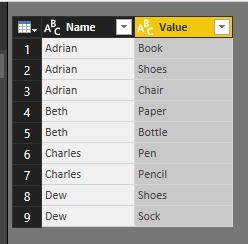
Split on each occurance of comma, and then unpivot the broken out items (select all but the Name and unpivot). I took the liberty of trimming and making the casing consistent:
let
Source = Table.FromRows(Json.Document(Binary.Decompress(Binary.FromText("LcxBCsAgDETRq4Ssc4naHqDgUlyIDSiKkSj0+rWl23nDdw63S3NoSGhECoFNwoNgTyErenJoeKalZ+isBEbmrPzBumjl8Ro3gs4t5vrJwfda/5KVWND7Bw==", BinaryEncoding.Base64), Compression.Deflate)), let _t = ((type text) meta [Serialized.Text = true]) in type table [Name = _t, Items = _t]),
#"Changed Type" = Table.TransformColumnTypes(Source,{{"Name", type text}, {"Items", type text}}),
#"Split Column by Delimiter" = Table.SplitColumn(#"Changed Type", "Items", Splitter.SplitTextByDelimiter(",", QuoteStyle.Csv), {"Items.1", "Items.2", "Items.3"}),
#"Changed Type1" = Table.TransformColumnTypes(#"Split Column by Delimiter",{{"Items.1", type text}, {"Items.2", type text}, {"Items.3", type text}}),
#"Unpivoted Columns" = Table.UnpivotOtherColumns(#"Changed Type1", {"Name"}, "Attribute", "Value"),
#"Removed Columns" = Table.RemoveColumns(#"Unpivoted Columns",{"Attribute"}),
#"Trimmed Text" = Table.TransformColumns(#"Removed Columns",{{"Value", Text.Trim, type text}}),
#"Capitalized Each Word" = Table.TransformColumns(#"Trimmed Text",{{"Value", Text.Proper, type text}})
in
#"Capitalized Each Word"
Hi Both,
What I want to achieve is the pivot table, not unpivot table.
So instead of each row consists only 1 item, i want to consolidate them into column with comma separated values.
Hi,
I am confused. Show your actual data and also your expected result.
Hi,
In the Query Editor window (Edit Query), right click on the heading of the second column and under Split columns > Delimiter > Comma, go to Advanced and select rows there. Click on OK. Now each item will appear in its own cell. You can create a Pivot Table.
Sign up to receive a private message when registration opens and key events begin.
If you have recently started exploring Fabric, we'd love to hear how it's going. Your feedback can help with product improvements.
| User | Count |
|---|---|
| 33 | |
| 26 | |
| 23 | |
| 21 | |
| 15 |
| User | Count |
|---|---|
| 63 | |
| 43 | |
| 28 | |
| 24 | |
| 22 |