Join us at FabCon Atlanta from March 16 - 20, 2026, for the ultimate Fabric, Power BI, AI and SQL community-led event. Save $200 with code FABCOMM.
Register now!The Power BI Data Visualization World Championships is back! It's time to submit your entry. Live now!
Hello. Please can someone advise how I can go from the first table to the second table? Each number, in column A, has a name in column B and occupies one to several rows depending on how many parameters are associated with that Number/Name. I would like to pivot by column C, and provide a Yes value in the relevent columns where each parameter occurs for each Number/Name.
Thank you.
| Number | Name | Parameter | ||||||
| 1 | A | A | ||||||
| 1 | A | B | ||||||
| 2 | B | A | ||||||
| 2 | B | B | ||||||
| 2 | B | C | ||||||
| 3 | C | C | ||||||
| 3 | C | D | ||||||
| 4 | D | B | ||||||
| 4 | D | C | ||||||
| 4 | D | D | ||||||
| 4 | D | E | ||||||
| 5 | E | C | ||||||
| 5 | E | D | ||||||
| 5 | E | E | ||||||
| 5 | E | F | ||||||
| 5 | E | G | ||||||
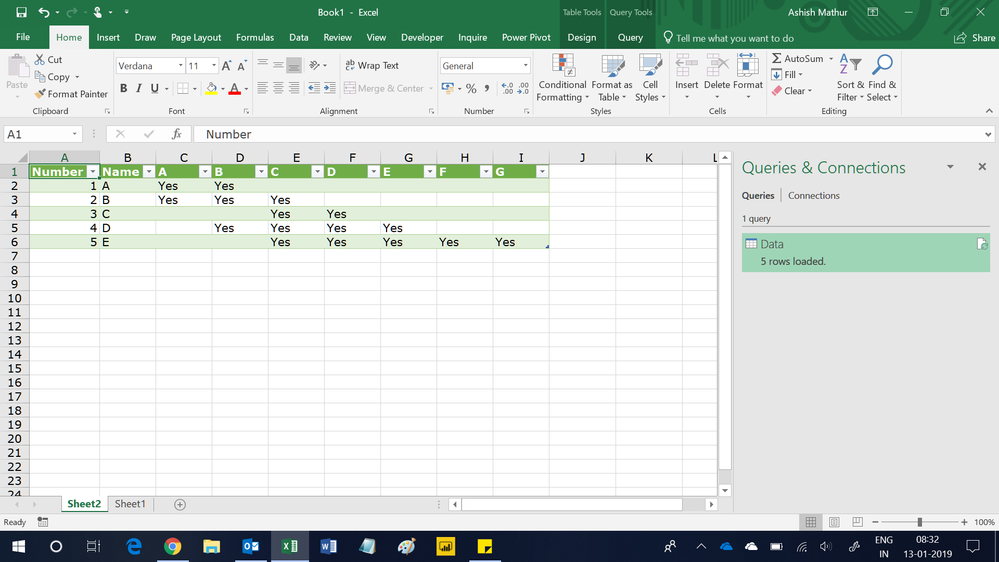
| Number | Name | A | B | C | D | E | F | G |
| 1 | A | Yes | Yes | |||||
| 2 | B | Yes | Yes | Yes | ||||
| 3 | C | Yes | Yes | |||||
| 4 | D | Yes | Yes | Yes | Yes | |||
| 5 | E | Yes | Yes | Yes | Yes |
Solved! Go to Solution.
Hi,
This M code works
let
Source = Excel.CurrentWorkbook(){[Name="Data"]}[Content],
#"Changed Type" = Table.TransformColumnTypes(Source,{{"Number", Int64.Type}, {"Name", type text}, {"Parameter", type text}}),
#"Added Custom" = Table.AddColumn(#"Changed Type", "Custom", each "Yes"),
#"Pivoted Column" = Table.Pivot(#"Added Custom", List.Distinct(#"Added Custom"[Parameter]), "Parameter", "Custom")
in
#"Pivoted Column"
Hi,
This M code works
let
Source = Excel.CurrentWorkbook(){[Name="Data"]}[Content],
#"Changed Type" = Table.TransformColumnTypes(Source,{{"Number", Int64.Type}, {"Name", type text}, {"Parameter", type text}}),
#"Added Custom" = Table.AddColumn(#"Changed Type", "Custom", each "Yes"),
#"Pivoted Column" = Table.Pivot(#"Added Custom", List.Distinct(#"Added Custom"[Parameter]), "Parameter", "Custom")
in
#"Pivoted Column"
You are welcome.
Did I answer your question correctly? Mark my answer as a solution!
Proud to be a Datanaut!
Hi @LivioLanzo Thanks, can I do this in the Query Editor? If so, I can't work out how sorry.
Hi @tgjones43
it is possible to do it within Power Query but it would require more steps and be less efficient
Did I answer your question correctly? Mark my answer as a solution!
Proud to be a Datanaut!
The Power BI Data Visualization World Championships is back! It's time to submit your entry.
Check out the January 2026 Power BI update to learn about new features.
| User | Count |
|---|---|
| 60 | |
| 49 | |
| 30 | |
| 25 | |
| 23 |
| User | Count |
|---|---|
| 131 | |
| 103 | |
| 58 | |
| 39 | |
| 31 |